Free Shipping on Domestic Orders $75+

LG L1200 External Housing Replacement

What you need

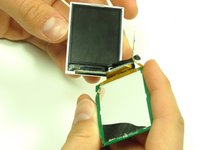
  1. LG L1200 External Housing Replacement, Inner LCD Screen: step 1, image 1 of 1
    • Make sure you remove the battery by lifting the tab on the back of the phone before opening the case.

    • Flip open the phone and locate the four screw covers.

    Ask FixBot
    Add Comment

  2. LG L1200 External Housing Replacement: step 2, image 1 of 1
    • Remove all four screw covers by using an IPod opening tool. They should come off relatively easy.

    Ask FixBot

    Add Comment

  3. LG L1200 External Housing Replacement: step 3, image 1 of 1
    • Using a T6 Torx screwdriver, remove all four screws.

    Ask FixBot

    Add Comment

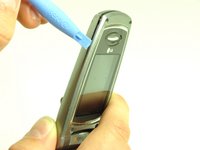
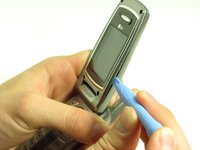
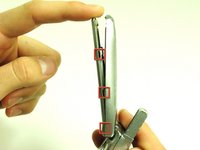
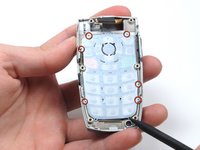
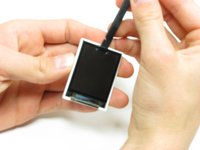
  4. LG L1200 External Housing Replacement: step 4, image 1 of 3 LG L1200 External Housing Replacement: step 4, image 2 of 3 LG L1200 External Housing Replacement: step 4, image 3 of 3
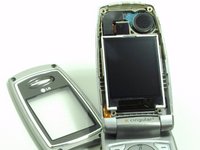
    • Once the screws are removed, use an IPod opening tool to separate the front cover from the inner screen cover.

    • Run the Ipod opening tool down both sides,disconnecting the tabs that hold the covers together.

    Ask FixBot
    Add Comment

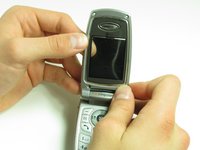
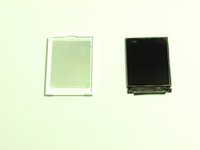
  5. LG L1200 External Housing Replacement: step 5, image 1 of 2 LG L1200 External Housing Replacement: step 5, image 2 of 2
    • Pull the inner screen cover towards you and up in order to separate it from the front cover.

    Ask FixBot
    Add Comment

  6. LG L1200 External Housing Replacement: step 6, image 1 of 1
    • Remove the tape from the bottom of the LCD screen.

    Ask FixBot

    Add Comment

  7. LG L1200 External Housing Replacement: step 7, image 1 of 3 LG L1200 External Housing Replacement: step 7, image 2 of 3 LG L1200 External Housing Replacement: step 7, image 3 of 3
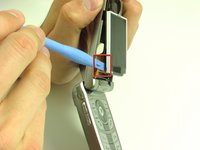
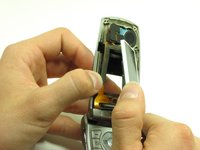
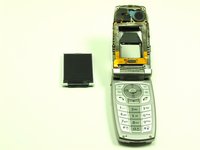
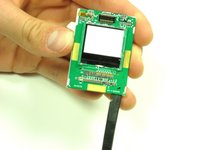
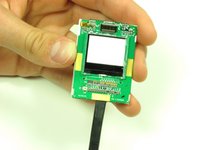
    • Carefully lift the LCD screen and peel it from the gold ribbon. The sticky connection runs all the way around the LCD screen.

    Ask FixBot

    Add Comment

  8. LG L1200 External Housing Replacement: step 8, image 1 of 3 LG L1200 External Housing Replacement: step 8, image 2 of 3 LG L1200 External Housing Replacement: step 8, image 3 of 3
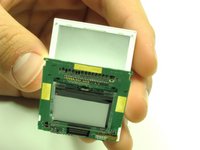
    • Flip the screen over so that you can see the outer LCD screen and the circuit board.

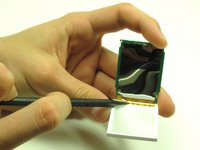
    • Insert spudger in the bottom right corner.

    • Lift up and move the spudger across the bottom.

    • The third photo is rotated 180 degrees.

    Ask FixBot

    Add Comment

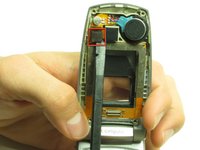
  9. LG L1200 External Housing Replacement: step 9, image 1 of 2 LG L1200 External Housing Replacement: step 9, image 2 of 2
    • Use the pointy side of the spudger to peel off the interior tape.

    • Flip the assembly over and peel the circuit board from the screen.

    Ask FixBot
    Add Comment

  10. LG L1200 External Housing Replacement: step 10, image 1 of 2 LG L1200 External Housing Replacement: step 10, image 2 of 2
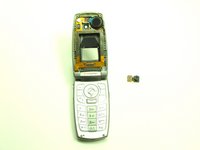
    • Use the spudger to remove the LCD screen from its backing.

    Ask FixBot
    Add Comment

  11. LG L1200 External Housing Replacement, Camera: step 11, image 1 of 1
    • Carefully slide the spudger behind the main ribbon in order to separate it from the inside cover of the phone.

    Ask FixBot

    Add Comment

  12. LG L1200 External Housing Replacement: step 12, image 1 of 2 LG L1200 External Housing Replacement: step 12, image 2 of 2
    • Use a spudger to pop off the camera ribbon from the main ribbon. The camera component should separate entirely.

    Ask FixBot

    Add Comment

  13. LG L1200 External Housing Replacement, Logic Board: step 13, image 1 of 1
    • Make sure you remove the battery by lifting the tab on the back of the phone before opening the case.

    • Poke out rubber covers using a spudger or pointy object, such as a thumb tack.

    Ask FixBot

    Add Comment

  14. LG L1200 External Housing Replacement: step 14, image 1 of 1
    • Use a T6 torx screwdriver to unscrew the 6 screws that hold the back casing on.

    Ask FixBot

    Add Comment

  15. LG L1200 External Housing Replacement: step 15, image 1 of 1
    • Use IPod opening tool to separate back housing.

    • There are two tabs located on either side of the phone.

    Ask FixBot

    Add Comment

  16. LG L1200 External Housing Replacement: step 16, image 1 of 1
    • Separate the back housing from the phone.

    • Be careful not to rip out the wire (highlighted in yellow) when separating the back housing.

    Ask FixBot

    Add Comment

  17. LG L1200 External Housing Replacement: step 17, image 1 of 1
    • Use a spudger to disconnect antenna wire.

    Ask FixBot

    Add Comment

  18. LG L1200 External Housing Replacement: step 18, image 1 of 1
    • Use the IPod opening tool to pop out the logic board.

    Ask FixBot

    Add Comment

  19. LG L1200 External Housing Replacement: step 19, image 1 of 1
    • Use the IPod opening tool to disconnect the main ribbon.

    Ask FixBot

    Add Comment

  20. LG L1200 External Housing Replacement: step 20, image 1 of 1
    • Once the ribbon is detached, remove the logic board and replace if necessary.

    Ask FixBot

    Add Comment

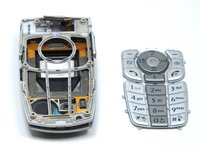
  21. LG L1200 External Housing Replacement, Keypad: step 21, image 1 of 1
    • The back of the keypad is shown here, next to the logic board (the logic board is turned over to expose the buttons).

    Ask FixBot

    Add Comment

  22. LG L1200 External Housing Replacement: step 22, image 1 of 2 LG L1200 External Housing Replacement: step 22, image 2 of 2
    • Using a spudger, lift the keypad off of the tabs.

    Ask FixBot

    Add Comment

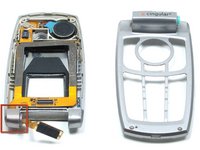
  23. LG L1200 External Housing Replacement, External Housing: step 23, image 1 of 1
    • Wedge a spudger or another harder prying tool in the connection between the top cover and the bottom cover on the right side.

    • Use a large amount of force to push the top cover off the bottom cover's blue extrusion.

    • Too much force may break the plastic of the top cover

    • When separating the top cover from the bottom cover, be careful not to tear the ribbon as you pull it out from the hinge.

    Ask FixBot

    Add Comment

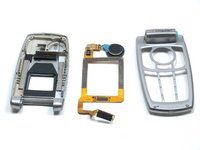
  24. LG L1200 External Housing Replacement: step 24, image 1 of 2 LG L1200 External Housing Replacement: step 24, image 2 of 2
    • Slide the ribbon out of the slot in the joint on the left side.

    • Pull the ribbon out of the top cover with your hand.

    • Once the ribbon is removed, you can replace the covers.

    Ask FixBot

    Add Comment

Conclusion

To reassemble your device, follow these instructions in reverse order.

Cancel: I did not complete this guide.

Joshua Herrmann

Member since: 04/16/10

8 Reputation

8 Guides authored

Team

Cal Poly, Team 6-14, Maness Spring 2010 Member of Cal Poly, Team 6-14, Maness Spring 2010

CPSU-MANESS-S10S6G14

4 Members

24 Guides authored

0 Guide Comments

Add Comment

View Statistics:

Past 24 Hours: 1

Past 7 Days: 11

Past 30 Days: 45

All Time: 1,523