Free Shipping on Domestic Orders $75+

LG K7 Headphone Jack Replacement

What you need

    1. LG K7 Headphone Jack Replacement, Battery: step 1, image 1 of 2 LG K7 Headphone Jack Replacement, Battery: step 1, image 2 of 2
      • Place a fingernail in slot at in the bottom edge of the phone.

      • Pull up on the back panel while holding down the rest of the phone steady with your hand.

      • Do not to pull too hard on the back panel or you may break it.

      Ask FixBot

      Add Comment

    2. LG K7 Headphone Jack Replacement: step 2, image 1 of 2 LG K7 Headphone Jack Replacement: step 2, image 2 of 2
      • Place a fingernail in the slot at the bottom edge of the battery.

      • Pull the battery out.

      Ask FixBot

      Add Comment

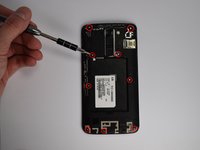
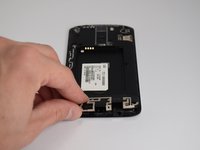
    1. LG K7 Headphone Jack Replacement, Headphone Jack: step 3, image 1 of 3 LG K7 Headphone Jack Replacement, Headphone Jack: step 3, image 2 of 3 LG K7 Headphone Jack Replacement, Headphone Jack: step 3, image 3 of 3
      • Remove the nine frame screws with a #J00 screwdriver.

      • The bottom three screws release the port cover at the bottom of the phone. The cover should lift off easily once the screws are out.

      • Pop the camera button frame off with a spudger. The home button should come off along with the frame.

      • Be gentle with the frame when removing it. The plastic is very thin and can easily break.

      Ask FixBot

      Add Comment

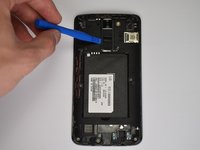
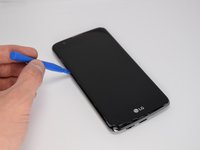
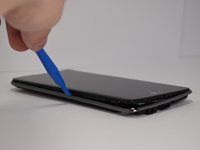
    2. LG K7 Headphone Jack Replacement: step 4, image 1 of 2 LG K7 Headphone Jack Replacement: step 4, image 2 of 2
      • Use a plastic opening tool to separate the screen from the outer frame.

      • The frame is held to the rest of the phone with plastic tabs. Release each tab one at a time around the phone for the easiest removal.

      • Do not bend the outer frame or screen when separating them. This will severely damage the phone.

      Ask FixBot

      Add Comment

    3. LG K7 Headphone Jack Replacement: step 5, image 1 of 1
      • Line up a plastic opening tool underneath the headphone jack and hold the main body of the phone down.

      • Lift or the plastic opening tool to separate the headphone jack from the main body of the phone.

      • Be careful to not damage the components that the headphone jack sits in.

      Ask FixBot

      Add Comment

Conclusion

To reassemble your device, follow these instructions in reverse order.

Cancel: I did not complete this guide.

2 other people completed this guide.

James Ngo

Member since: 01/19/18

461 Reputation

4 Guides authored

Team

Cal Poly, Team S21-G5, Banghart Winter 2018 Member of Cal Poly, Team S21-G5, Banghart Winter 2018

CPSU-BANGHART-W18S21G5

4 Members

48 Guides authored

0 Guide Comments

Add Comment

View Statistics:

Past 24 Hours: 0

Past 7 Days: 7

Past 30 Days: 75

All Time: 1,332