Free Shipping on Domestic Orders $75+

LG K30 Front-Facing Camera Replacement

What you need

    1. LG K30 Front-Facing Camera Replacement, Battery: step 1, image 1 of 2 LG K30 Front-Facing Camera Replacement, Battery: step 1, image 2 of 2
      • Before disassembling your LG K30, discharge the battery below 25%. A charged lithium-ion battery can catch fire and/or explode if accidentally punctured.

      • Power off your Phone before beginning disassembly.

      • Use the 'Jimmy' and 'Metal Spudger' to slowly pry open the outsides of the back case.

      Ask FixBot

      Add Comment

    2. LG K30 Front-Facing Camera Replacement: step 2, image 1 of 1
      • Remove the thirteen 3.4 mm Phillips #00 screws securing the midframe to the display assembly.

      Ask FixBot

      Add Comment

    3. LG K30 Front-Facing Camera Replacement: step 3, image 1 of 1
      • Use a metal spudger or plastic opening tool to pry open the outer cover.

      Ask FixBot

      Add Comment

    4. LG K30 Front-Facing Camera Replacement: step 4, image 1 of 1
      • Use the flat end of a spudger to detach the battery connector from the logic board.

      Ask FixBot

      Add Comment

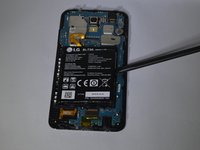
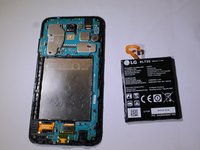
    5. LG K30 Front-Facing Camera Replacement: step 5, image 1 of 2 LG K30 Front-Facing Camera Replacement: step 5, image 2 of 2
      • Use a spudger to pry the battery from the phone.

      • There may be an adhesive on the back of the battery and the phone. Pry the battery gently to prevent puncture or damage.

      • Do not bend or puncture the battery.

      Ask FixBot

      Add Comment

    1. LG K30 Front-Facing Camera Replacement, Front-Facing Camera: step 6, image 1 of 1
      • Use the plastic spudger to disconnect the cable connector.

      Ask FixBot

      Add Comment

    2. LG K30 Front-Facing Camera Replacement: step 7, image 1 of 1
      • Gently pry out the front-facing camera from the device.

      Ask FixBot

      Add Comment

Conclusion

To reassemble your device, follow these instructions in reverse order.

Cancel: I did not complete this guide.

0 Guide Comments

Add Comment

View Statistics:

Past 24 Hours: 0

Past 7 Days: 1

Past 30 Days: 37

All Time: 554