Free Shipping on Domestic Orders $75+

LG K10 Loudspeaker Replacement

What you need

Video Overview

    1. LG K10 Loudspeaker Replacement, Loudspeaker: step 1, image 1 of 1
      • Power off the device.

      • Remove the back case.

      Ask FixBot

      Add Comment

    2. LG K10 Loudspeaker Replacement: step 2, image 1 of 1
      • Remove the battery

      Ask FixBot

      Add Comment

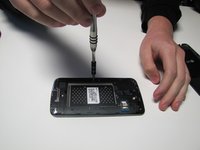
    3. LG K10 Loudspeaker Replacement: step 3, image 1 of 2 LG K10 Loudspeaker Replacement: step 3, image 2 of 2
      • Unscrew all of the mid-frame screws, and use opening picks or a plastic opener to carefully remove the frame.

      Ask FixBot

      Add Comment

    4. LG K10 Loudspeaker Replacement: step 4, image 1 of 1
      Tool used on this step:
      Tweezers
      $4.99
      Buy
      • With tweezers remove the loudspeaker from the mid-frame.

      • The loudspeaker is attached to the mid-frame with a thin layer of adhesive and should break free without much force.

      Ask FixBot

      Add Comment

Conclusion

To reassemble your device, follow these instructions in reverse order.

Cancel: I did not complete this guide.

2 other people completed this guide.

Witrigs

Member since: 11/24/15

71,142 Reputation

377 Guides authored

0 Guide Comments

Add Comment

View Statistics:

Past 24 Hours: 3

Past 7 Days: 24

Past 30 Days: 96

All Time: 3,297