Free Shipping on Domestic Orders $75+

LG K10 Earphone jack Replacement

What you need

Video Overview

  1. LG K10 Earphone jack Replacement, Earphone jack: step 1, image 1 of 1
    • Power off the device.

    • Remove the back lining

    Ask FixBot

    Add Comment

  2. LG K10 Earphone jack Replacement: step 2, image 1 of 1
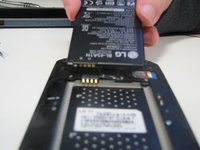
    • Remove the battery

    Ask FixBot

    Add Comment

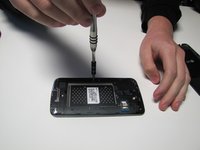
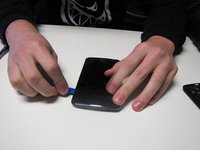
  3. LG K10 Earphone jack Replacement: step 3, image 1 of 2 LG K10 Earphone jack Replacement: step 3, image 2 of 2
    • Unscrew every screw of the bottom of the phone and use guitar picks to remove the plastic frame of the phone

    Ask FixBot

    Add Comment

  4. LG K10 Earphone jack Replacement: step 4, image 1 of 1
    Tool used on this step:
    Tweezers
    $4.99
    Buy
    • With tweezers remove the headphone jack piece on the motherboard, and insert the new piece in the position of the old one.

    Ask FixBot

    Add Comment

  5. LG K10 Earphone jack Replacement: step 5, image 1 of 1
    • Screw in the bottom case.

    Ask FixBot

    Add Comment

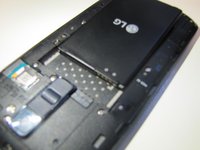
  6. LG K10 Earphone jack Replacement: step 6, image 1 of 2 LG K10 Earphone jack Replacement: step 6, image 2 of 2
    • Insert the battery and back case.

    Ask FixBot

    Add Comment

Conclusion

To reassemble your device, follow these instructions in reverse order.

Cancel: I did not complete this guide.

4 other people completed this guide.

Witrigs

Member since: 11/24/15

71,019 Reputation

377 Guides authored

1 Guide Comment

Read the detailed review published on this site if you are a student. Surely you will learn all the nuances of paper delegation and the secrets of writing services. Don't waste your time, guys!

Betty Dawson - Reply Share

Add Comment

View Statistics:

Past 24 Hours: 1

Past 7 Days: 7

Past 30 Days: 26

All Time: 5,088