Free Shipping on Domestic Orders $75+

LG G3 Vigor Display Assembly Replacement

What you need

  1. LG G3 Vigor Display Assembly Replacement, Rear Case: step 1, image 1 of 1
    • Locate the notch on the bottom right of the phone.

    Ask FixBot

    Add Comment

  2. LG G3 Vigor Display Assembly Replacement: step 2, image 1 of 1
    • Gently pull the cover on the back of the phone off to locate the battery.

    Ask FixBot

    Add Comment

  3. LG G3 Vigor Display Assembly Replacement, Battery: step 3, image 1 of 1
    • Remove the battery by lifting from the slot at the bottom of the battery.

    Ask FixBot

    Add Comment

  4. LG G3 Vigor Display Assembly Replacement, Midframe: step 4, image 1 of 1
    • Remove the twelve Phillips #00 screws securing the midframe to the rest of the phone.

    Ask FixBot

    Add Comment

  5. LG G3 Vigor Display Assembly Replacement: step 5, image 1 of 3 LG G3 Vigor Display Assembly Replacement: step 5, image 2 of 3 LG G3 Vigor Display Assembly Replacement: step 5, image 3 of 3
    • Work a plastic opening tool around the perimeter of the phone to separate the midframe from the rest of the phone.

    Ask FixBot

    Add Comment

  6. LG G3 Vigor Display Assembly Replacement, Rear Facing Camera: step 6, image 1 of 1
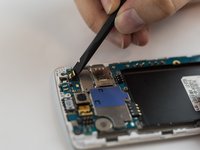
    • Use the spudger to gently unplug the ribbon cable connected to the motherboard. Then remove the rear facing camera.

    Ask FixBot

    Add Comment

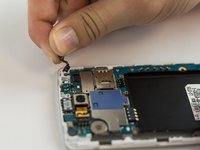
  7. LG G3 Vigor Display Assembly Replacement, Front Facing Camera: step 7, image 1 of 2 LG G3 Vigor Display Assembly Replacement, Front Facing Camera: step 7, image 2 of 2
    • Use the spudger to gently unplug the ribbon cable connected to the motherboard.

    • Remove the front camera.

    Ask FixBot

    Add Comment

  8. LG G3 Vigor Display Assembly Replacement, Motherboard: step 8, image 1 of 1
    • Use the flat edge of a spudger to disconnect the motherboard ribbon connector.

    Ask FixBot

    Add Comment

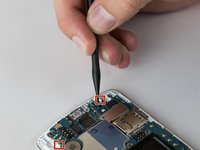
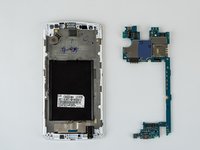
  9. LG G3 Vigor Display Assembly Replacement: step 9, image 1 of 2 LG G3 Vigor Display Assembly Replacement: step 9, image 2 of 2
    • Use the pointed end of a spudger to push back the two motherboard retaining flaps.

    • The motherboard should now be able to be lifted out of the device.

    Ask FixBot

    Add Comment

  10. LG G3 Vigor Display Assembly Replacement, Vibration Motor: step 10, image 1 of 1
    • Use a spudger to remove the vibration motor.

    • It may have some slight adhesive, so some force may be necessary.

    Ask FixBot

    Add Comment

  11. LG G3 Vigor Display Assembly Replacement, Earpiece Speaker: step 11, image 1 of 1
    • Remove the earpiece speaker with the metal spudger by prying it out.

    Ask FixBot

    Add Comment

  12. LG G3 Vigor Display Assembly Replacement, Headphone Jack: step 12, image 1 of 1
    • Remove the headphone jack by inserting the spudger into the jack and pulling it up and out.

    Ask FixBot

    Add Comment

  13. LG G3 Vigor Display Assembly Replacement, Display Assembly: step 13, image 1 of 1
    Tool used on this step:
    Tweezers
    $4.99
    Buy
    • Using tweezers peel back the glued down ribbon cable at the bottom of the phone.

    Ask FixBot

    Add Comment

  14. LG G3 Vigor Display Assembly Replacement: step 14, image 1 of 1
    • Using a heat gun or the iFixit iOpener tool heat up the edges of the devices screen.

    • After a few minutes heating up the edges of the screen use a metal spudger tool or any other flat tool to dig under the edge of the screen.

    • Once under the edge of the screen work your way around the entire perimeter of the screen and pull the screen off.

    Ask FixBot

    Add Comment

  15. LG G3 Vigor Display Assembly Replacement: step 15, image 1 of 1
    • Once the screen has come off pull the ribbon cables through the hole and remove the screen completely.

    Ask FixBot

    Add Comment

Conclusion

To reassemble your device, follow these instructions in reverse order.

Cancel: I did not complete this guide.

6 other people completed this guide.

Zhong Zhen

Member since: 02/10/16

675 Reputation

3 Guides authored

Team

USF Tampa, Team 12-5, Eyestone Spring 2016 Member of USF Tampa, Team 12-5, Eyestone Spring 2016

USFT-EYESTONE-S16S12G5

4 Members

5 Guides authored

2 Guide Comments

i tried to replace the glass, the phone is now stuck at boot screen. the os would load occasionally before. possible battery/water problem. are there any hardware issue that would cause the boot screen (blinking red light)

Ryan Fukushima - Reply Share

Would anyone know a place to source the glass/lcd assembly. Mucho thanks!

Christopher Obidniak - Reply Share

Add Comment

View Statistics:

Past 24 Hours: 1

Past 7 Days: 7

Past 30 Days: 25

All Time: 2,510