
LG G Watch R Motherboard Replacement

Westley Courchene and 4 other contributors
Last updated on Jan 4, 2016
Views: 4.2K
View statistics:
- Past 24 Hours:
- 5
- Past 7 Days:
- 28
- Past 30 Days:
- 99
- All Time:
- 4,247
Comments: 10
7 comments on steps, 3 guide comments.
Go to guide commentsCompleted: 3 4
3 people have marked this guide "completed." Will you be next?
4 people have marked this guide "completed." Including you — great job!
Favorites: 1 2
1 person has favorited (and subscribed to) this guide. Will you be next?
2 people have favorited (and subscribed to) this guide — including you!
Featured Student Guide
This guide has been the hard work of our awesome students and is found to be exceptionally cool by the iFixit staff.
Introduction
Go to step 1 ↓In this guide, you'll disconnect all components in order to replace a faulty or damaged motherboard in your LG G Watch R. Motherboard failure will typically stop your watch from working or even turning on. However, the motherboard is usually the most expensive part of the device to replace—so check the troubleshooting page to rule out other factors before replacing the motherboard. Since your data is stored on a chip on the motherboard, be aware that replacing the board will cause you to lose any saved data.
What you need
Tools


-
-
-
Place the watch upside down on a hard surface so that its back case is facing upright.
-
Use a T4 Torx Star screwdriver to remove the four 4.0 mm Torx screws from the corners of the back case.
 Ask FixBot
-
-
-
Use a plastic opening tool to pry open the back case from both sides of the watch.
-
-
-
-
-
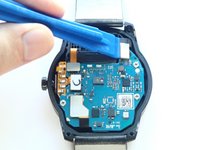
With a plastic opening tool, disconnect the four connectors on the top of the motherboard.
-
-
-
-
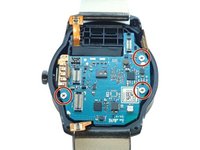
Remove three 3.0 mm Phillips screws on the edges of the motherboard with a Phillips #000 screwdriver.
-
-
-
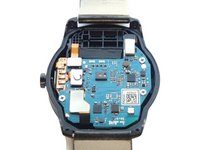
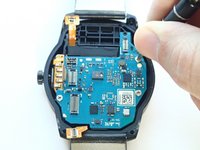
Grasp the edges of the motherboard and slide it slightly towards the right to remove it from its case.
-
-





To reassemble your device, follow these instructions in reverse order.
Cancel: I did not complete this guide.
3 other people completed this guide.

Team

USF Tampa, Team 1-1, Remmell Fall 2015 Member of USF Tampa, Team 1-1, Remmell Fall 2015
USFT-REMMELL-F15S1G1
5 Members
168 Guides authored
3 Guide Comments
Where do I buy a replacement motherboard from??
Did you ever find anywhere to order a replacement motherboard?
