Introduction
Hello, in this guide I’ll show you how to replace the capacitors on this monitor and possibly make it working again.
What you need
-
-
-
Use a spudger to remove the plastic basel around the display and remove any screws that you see on the back.
-
Carefully lift up the display assembly and set it aside.
 Ask FixBot
-
-
-
-
Lift up the metal bracket and carefully remove all connectors
-
-
-
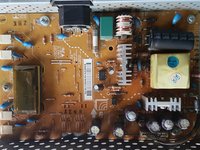
After you flip the metal bracket, it should look something like this.
-
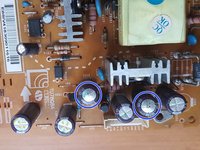
Identify the faulty capacitors, remove them and solder new ones.
-
In my case, those marked in blue were busted and prevented the monitor from working.
-
For good measure I replaced all of them with brand new ones. It is a good idea that you do too.
-
-


To reassemble your device, follow these instructions in reverse order.
Cancel: I did not complete this guide.
9 other people completed this guide.

5 Guide Comments
This repair guide helped me fix my LG Flatron W2242T 22" computer monitor that powered off but would not power back on.
After making the repair, replacing bulging capacitors C203, C204, C205, and C212 with replacements of the same value, the monitor powered back on and works again!
Hello,
I am very glad to hear that my guide helped you!
Necesito reparar el apagado del reflector trasero, se apaga cuando quiere y hay que esperar de cinco a diez minutos para encenderlo de nuevo con el encendido del monitor, es muy molesto, ahora tiene un problema nuevo, la pantalla se divide en dos tonos diferentes, el flatron es el W2043S
