
LG Flare Microphone Replacement

Kelsey Hanna and 7 other contributors
Last updated on May 7, 2024
Views: 520
View statistics:
- Past 24 Hours:
- 0
- Past 7 Days:
- 4
- Past 30 Days:
- 26
- All Time:
- 520
Comments: 0
No one has left comments on this guide. Will you be first?
Go to guide commentsCompleted: 0 1
No one has marked this guide "completed." Will you be the first?
1 person has marked this guide "completed." It's you — great job!
Favorites: 0 1
No one has favorited (and subscribed to) this guide. Will you be the first?
1 person has favorited (and subscribed to) this guide — and that's you!
Needs Better Images
Better photos will improve this guide. Help out by taking, editing, or uploading new ones!
Markup Mishap
This guide needs better markups. Help out by correcting or making some markup annotations.
Better Introduction
Improve this guide by completing or revising its introduction.
Missing Details
Some of this guide's details are missing. Help users by adding tools, difficulty, or time.
Introduction
Go to step 1 ↓This guide will show you how to take your LG Flare apart to reach the microphone and replace it.
If you find yourself having cell phone issues such as someone not being able to hear you during a phone call or audio recordings are not picking up any noise, you may have a broken microphone.
What you need
Tools


-
-
-
Remove the back cover by pressing on the top middle raised lines of the back cover and sliding the cover off.
 Ask FixBot
-
-
-
Use appropriately sized Philips-head screwdriver to remove the six small screws on the back of the phone under the battery.
-
-
-
Use an opening tool to pop the back panel apart around the edges, and then pry the whole piece off.
-
-
-
Use an opening tool to separate the tabs on the green circuit board from the front body of the phone.
-
-
-
Use an opening tool to pop the orange connecting strip off of the circuit board.
-
-
-
Tool used on this step:Tweezers$4.99
-
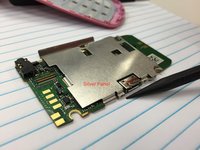
Using tweezers and wedge, remove silver piece from green circuit board.
-
-
-
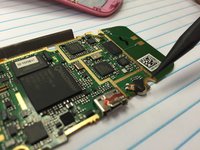
Solder new microphone in place OR buy replacement circuit board from www.ifixit.com and replace.
-
-




To reassemble your device, follow these instructions in reverse order.

Team

Ohio State, Team 1-3, Garvin Fall 2015 Member of Ohio State, Team 1-3, Garvin Fall 2015
OSU-GARVIN-F15S1G3
4 Members
24 Guides authored
