
LG Encore GT550 Audio Jack Replacement

Lindsey Harding and 6 other contributors
Last updated on May 23, 2022
Views: 691
View statistics:
- Past 24 Hours:
- 3
- Past 7 Days:
- 20
- Past 30 Days:
- 81
- All Time:
- 691
Comments: 0
No one has left comments on this guide. Will you be first?
Go to guide commentsCompleted: 1 2
1 person has marked this guide "completed." Will you be next?
2 people have marked this guide "completed." Including you — great job!
Favorites: 0 1
No one has favorited (and subscribed to) this guide. Will you be the first?
1 person has favorited (and subscribed to) this guide — and that's you!
Inconsistent Images
Updating the images on this guide to be more consistent with the prerequisites would increase its awesomeness.
Better Introduction
Improve this guide by completing or revising its introduction.
Introduction
Go to step 1 ↓If you need to replace the audio jack in your LG Encore GT550, follow this guide.
What you need
Tools
-
Spudger4.9


-
-
-
Turn the device over so the backside is facing up.
-
Use your fingers or an opening tool to remove the back cover in order to expose the battery.
 Ask FixBot
-
-
-
Use your fingers or a spudger to remove the battery. Lift it from the side opposite of the camera.
-
-
-
-
Use a Phillips #0 screwdriver to remove six screws around the perimeter of the phone.
-
-
-
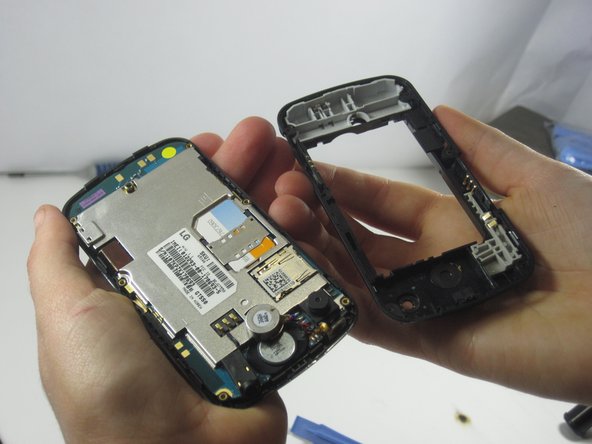
Place the opening tool in the seam of the device and pry around the perimeter to separate the top case from the bottom case.
-
-
-
Place the opening tool on the top on the device between the phone casing and motherboard.
-
Separate the screen and the motherboard.
-
-




To reassemble your device, follow these instructions in reverse order.
Cancel: I did not complete this guide.
One other person completed this guide.

Team

UMass Dartmouth, Team 1-4, Shastany Fall 2013 Member of UMass Dartmouth, Team 1-4, Shastany Fall 2013
UMASSD-SHASTANY-F13S1G4
2 Members
60 Guides authored
