Free Shipping on Domestic Orders $75+

LG Enact Screen Replacement

What you need

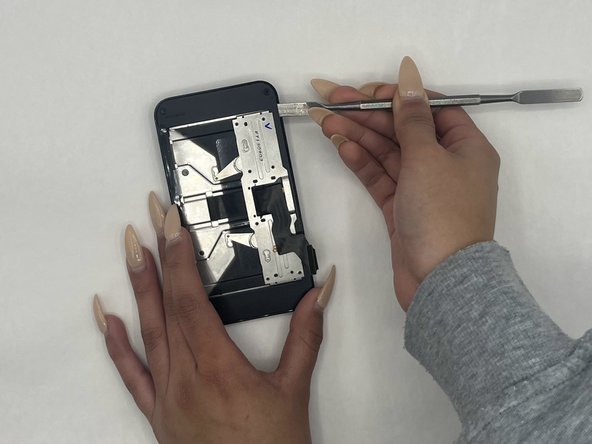
    1. LG Enact Screen Replacement, Battery: step 1, image 1 of 3 LG Enact Screen Replacement, Battery: step 1, image 2 of 3 LG Enact Screen Replacement, Battery: step 1, image 3 of 3
      • Open the back cover by prying into the bottom tab with an iFixit opening tool.

      Ask FixBot

      Add Comment

    2. LG Enact Screen Replacement: step 2, image 1 of 3 LG Enact Screen Replacement: step 2, image 2 of 3 LG Enact Screen Replacement: step 2, image 3 of 3
      • Use an iFixit opening tool to remove the battery.

      Ask FixBot

      Add Comment

    1. LG Enact Screen Replacement, Speaker: step 3, image 1 of 1
      • Remove the three 1.2 mm screws from the speaker using a Phillips #00 screwdriver.

      Ask FixBot

      Add Comment

    2. LG Enact Screen Replacement: step 4, image 1 of 2 LG Enact Screen Replacement: step 4, image 2 of 2
      • Use an iFixit opening pick to pop out the speaker.

      Ask FixBot

      Add Comment

    1. LG Enact Screen Replacement, Midframe: step 5, image 1 of 2 LG Enact Screen Replacement, Midframe: step 5, image 2 of 2
      • Remove the nine 1.2 mm screws from the midframe using a Phillips #00 screwdriver.

      Ask FixBot

      Add Comment

    2. LG Enact Screen Replacement: step 6, image 1 of 1
      • Use the iFixit opening pick to pry out the midframe.

      Ask FixBot

      Add Comment

    1. LG Enact Screen Replacement, Motherboard: step 7, image 1 of 2 LG Enact Screen Replacement, Motherboard: step 7, image 2 of 2
      • Unplug the four ports connected to the motherboard.

      • Disconnect the two wires on top of the battery.

      • Disconnect the two wires under the battery.

      Ask FixBot

      Add Comment

    2. LG Enact Screen Replacement: step 8, image 1 of 2 LG Enact Screen Replacement: step 8, image 2 of 2
      • Slowly pry out the motherboard using an iFixit opening pick.

      Ask FixBot

      Add Comment

    1. LG Enact Screen Replacement, Charging Port: step 9, image 1 of 2 LG Enact Screen Replacement, Charging Port: step 9, image 2 of 2
      • Gently peel off the orange strip attached to the charging port using an iFixit opening pick.

      Ask FixBot

      Add Comment

    1. LG Enact Screen Replacement, Keyboard: step 10, image 1 of 3 LG Enact Screen Replacement, Keyboard: step 10, image 2 of 3 LG Enact Screen Replacement, Keyboard: step 10, image 3 of 3
      • Gently remove the blue metal plate using an iFixit opening pick.

      • Gently remove the black plastic from inside the battery compartment.

      Ask FixBot

      Add Comment

    2. LG Enact Screen Replacement: step 11, image 1 of 1
      • Remove seven 1.2 mm screws with a Phillips #00 screwdriver.

      Ask FixBot

      Add Comment

    3. LG Enact Screen Replacement: step 12, image 1 of 1
      • Remove the ribbon cable from the battery compartment.

      Ask FixBot

      Add Comment

    4. LG Enact Screen Replacement: step 13, image 1 of 3 LG Enact Screen Replacement: step 13, image 2 of 3 LG Enact Screen Replacement: step 13, image 3 of 3
      • Remove the plastic half containing the keyboard.

      Ask FixBot

      Add Comment

    1. LG Enact Screen Replacement, Screen: step 14, image 1 of 1
      • Remove the four 1.2 mm screws from the corners using a Phillips #00 screwdriver.

      Ask FixBot

      Add Comment

    2. LG Enact Screen Replacement: step 15, image 1 of 2 LG Enact Screen Replacement: step 15, image 2 of 2
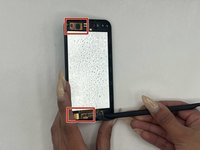
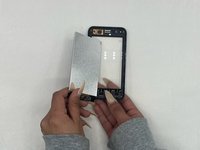
      • Gently pry the screen open with a nylon spudger, making sure you’re not damaging the LCD or the plastic.

      Ask FixBot

      Add Comment

    3. LG Enact Screen Replacement: step 16, image 1 of 2 LG Enact Screen Replacement: step 16, image 2 of 2
      • Detach the two connectors from the screen and pop the screen open using a spudger.

      Ask FixBot

      Add Comment

    4. LG Enact Screen Replacement: step 17, image 1 of 1
      • Disconnect the touch button sensors using a spudger.

      Ask FixBot

      Add Comment

    5. LG Enact Screen Replacement: step 18, image 1 of 1
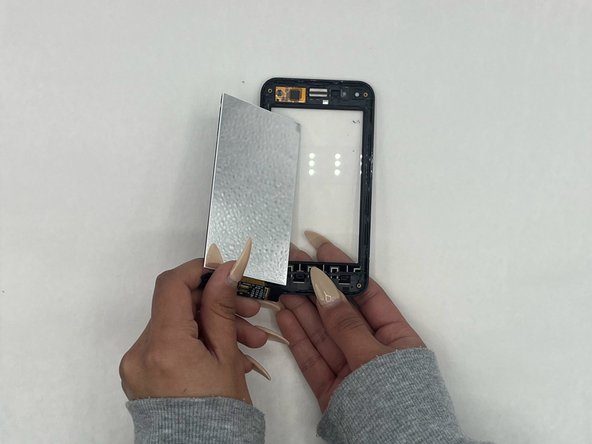
      • Gently disconnect and remove the LCD using a spudger.

      Ask FixBot

      Add Comment

Conclusion

To reassemble your device, follow these instructions in reverse order.

Cancel: I did not complete this guide.

0 Guide Comments

Add Comment

View Statistics:

Past 24 Hours: 0

Past 7 Days: 2

Past 30 Days: 25

All Time: 311