
LG Chocolate Sliding Front Replacement

Maci Miri and 7 other contributors
Last updated on Oct 14, 2025
Views: 730
View statistics:
- Past 24 Hours:
- 0
- Past 7 Days:
- 6
- Past 30 Days:
- 29
- All Time:
- 730
Comments: 0
No one has left comments on this guide. Will you be first?
Go to guide commentsCompleted: 2 3
2 people have marked this guide "completed." Will you be next?
3 people have marked this guide "completed." Including you — great job!
Favorites: 0 1
No one has favorited (and subscribed to) this guide. Will you be the first?
1 person has favorited (and subscribed to) this guide — and that's you!
Needs Better Images
Better photos will improve this guide. Help out by taking, editing, or uploading new ones!
Better Introduction
Improve this guide by completing or revising its introduction.
Missing Details
Some of this guide's details are missing. Help users by adding tools, difficulty, or time.
What you need
Tools
-
Spudger4.9


-
-
-
Find a sliding button on the lower back side of the device and with your finger, slide it to the left firmly.
 Ask FixBot
-
-
-
-
-
You will need to use a Phillips #00 screwdriver.
-
Remove the four screws located at the corners beneath the battery.
-
Detach the back case from the phone.
-
-
-
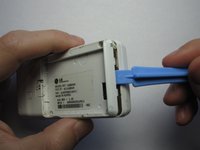
Take the case off by using a plastic opening tool.
-
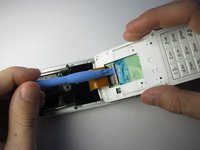
Continue using the plastic opening tool around the sides of the device.
-
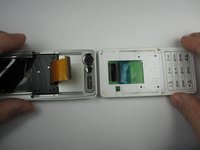
Unhook the eight tabs securing the back cover to the rest of the phone as seen in the second photo.
-
The back speaker will be connected to the motherboard.
-
This must be disconnected in order to remove the case.
-
-
-
-
-
Unscrew the 4 Phillips 00 screws that connect the two halves of the phone together.
-
-
-
Between the two halves is a ribbon. Use a plastic opening tool to flip up the lock and disconnect it.
-
-
-
-
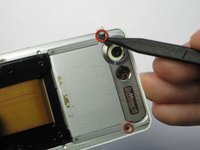
Pry off the plastic tabs that cover two screws, as shown in the first picture.
-
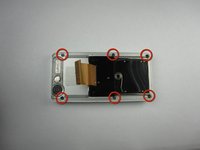
Then, remove the 6 Phillips 00 screws from the back of the case, as shown in the second picture.
-
-
-
Pry off the back cover from the front of the case using a plastic opening tool.
-
-







To reassemble your device, follow these instructions in reverse order.
Cancel: I did not complete this guide.
2 other people completed this guide.

Team

Cal Poly, Team 19-46, Regan Winter 2013 Member of Cal Poly, Team 19-46, Regan Winter 2013
CPSU-REGAN-W13S19G46
4 Members
132 Guides authored
