
LG CU515 Keypad Replacement

Zack Mintzer and
Last updated on Jan 28, 2014
Views: 637
View statistics:
- Past 24 Hours:
- 0
- Past 7 Days:
- 2
- Past 30 Days:
- 16
- All Time:
- 637
Comments: 0
No one has left comments on this guide. Will you be first?
Go to guide commentsCompleted: 0 1
No one has marked this guide "completed." Will you be the first?
1 person has marked this guide "completed." It's you — great job!
Favorites: 0 1
No one has favorited (and subscribed to) this guide. Will you be the first?
1 person has favorited (and subscribed to) this guide — and that's you!
Student In Progress
This guide is being worked on by hardworking students.
Needs Better Images
Better photos will improve this guide. Help out by taking, editing, or uploading new ones!
What you need
Tools
-
Spudger4.9


Introduction
Go to step 1 ↓Replace the keypad for a new one.
-
-
-
Use your thumb to press down and slide off the back cover of the phone.
 Ask FixBot
-
-
-
-
-
Push the spudger between each of the two rubber cushions and the body of the phone. Then turn the spudger to pop each cushion out.
-
-
-
-
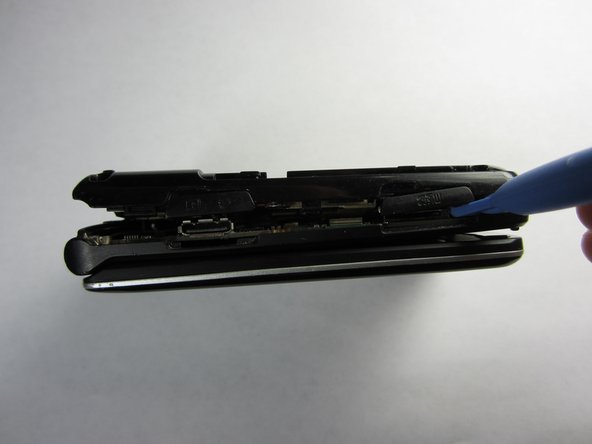
Push the spudger into the crack separating the two pieces of the phone.
-
Then use the plastic opening tools to pry the back off by separating the two pieces of the phone.
-
Repeat as necessary around the perimeter of the phone until the casing pops off. Use force as necessary without breaking the cover.
-
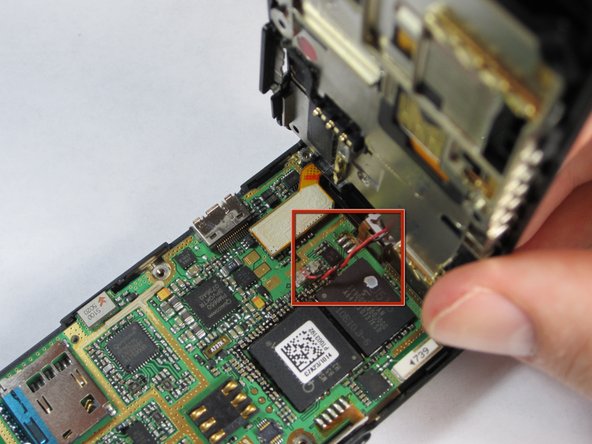
The back is attached to the motherboard by a wire, so don't pull the back casing off just yet.
-
-
-
Gently pull the wire up from the motherboard, separating the back of the phone and the motherboard.
-
-
-
Remove the plastic tab connecting the screen to the motherboard by pulling the tab up from the board.
-
-
-
Gently grasp one of the corners of the motherboard and simply lift it straight up out of the phone casing.
-
Replace the motherboard with a new one.
-
-
-
-
-
Push keypad up and out of the phone casing until they separate.
-
Replace with new keypad.
-
-





To reassemble your device, follow these instructions in reverse order.

Team

Cal Poly, Team 21-55, Johann Spring 2013 Member of Cal Poly, Team 21-55, Johann Spring 2013
CPSU-JOHANN-S13S21G55
4 Members
72 Guides authored
