Free Shipping on Domestic Orders $75+

LG CF360 Rear Speaker Replacement

What you need

  1. LG CF360 Rear Speaker Replacement, Battery: step 1, image 1 of 2 LG CF360 Rear Speaker Replacement, Battery: step 1, image 2 of 2
    • On the back of the phone, place your thumb on the three raised bumps and slide the back cover upward.

    Ask FixBot

    Add Comment

  2. LG CF360 Rear Speaker Replacement: step 2, image 1 of 1
    • Lift and remove the battery.

    Ask FixBot

    Add Comment

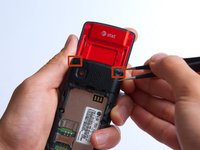
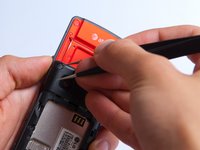
  3. LG CF360 Rear Speaker Replacement, Back Cover: step 3, image 1 of 2 LG CF360 Rear Speaker Replacement, Back Cover: step 3, image 2 of 2
    Tool used on this step:
    Tweezers
    $4.99
    Buy
    • Remove the two screw covers at the top of phone with tweezers.

    Ask FixBot

    Add Comment

  4. LG CF360 Rear Speaker Replacement: step 4, image 1 of 1
    • Remove the six Phillips #000 (3mm) screws.

    Ask FixBot

    Add Comment

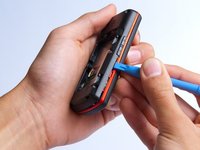
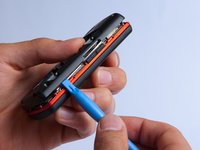
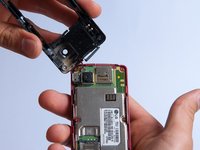
  5. LG CF360 Rear Speaker Replacement: step 5, image 1 of 3 LG CF360 Rear Speaker Replacement: step 5, image 2 of 3 LG CF360 Rear Speaker Replacement: step 5, image 3 of 3
    • Use the plastic opening tool to pry the back cover off. Insert the tool between the back cover and red mid section and go around the entire phone.

    • The plastic side buttons fall out when you take the back cover off.

    • The back cover is connected to the speaker by red and black wires.

    Ask FixBot

    Add Comment

  6. LG CF360 Rear Speaker Replacement: step 6, image 1 of 1
    • Use the tweezers to remove the red and black wires connecting the speaker to the green motherboard by pinching the sides of the plastic base near the motherboard.

    • Set the back cover with the speaker aside.

    Ask FixBot

    Add Comment

  7. LG CF360 Rear Speaker Replacement, Rear Speaker: step 7, image 1 of 1
    • Use the plastic opening tool to pry the speaker cover off of the phone.

    Ask FixBot

    Add Comment

  8. LG CF360 Rear Speaker Replacement: step 8, image 1 of 1
    • Use the plastic opening tool to pry the speaker out of the back cover.

    Ask FixBot

    Add Comment

Conclusion

To reassemble your device, follow these instructions in reverse order.

Cancel: I did not complete this guide.

One other person completed this guide.

Annie White

Member since: 10/18/13

265 Reputation

2 Guides authored

Team

Cal Poly, Team 4-27, Amido Fall 2013 Member of Cal Poly, Team 4-27, Amido Fall 2013

CPSU-AMIDO-F13S4G27

4 Members

27 Guides authored

1 Guide Comment

Where can I buy the replacement parts?

Sarah Birkett - Reply Share

Add Comment

View Statistics:

Past 24 Hours: 1

Past 7 Days: 8

Past 30 Days: 31

All Time: 769