
LG CF360 Back Cover Replacement

Kathrine Muirhead and 3 other contributors
Last updated on May 7, 2024
Views: 869
View statistics:
- Past 24 Hours:
- 3
- Past 7 Days:
- 18
- Past 30 Days:
- 95
- All Time:
- 869
Comments: 0
No one has left comments on this guide. Will you be first?
Go to guide commentsCompleted: 0 1
No one has marked this guide "completed." Will you be the first?
1 person has marked this guide "completed." It's you — great job!
Favorites: 2 3
2 people have favorited (and subscribed to) this guide. Will you be next?
3 people have favorited (and subscribed to) this guide — including you!
Introduction
Go to step 1 ↓The back case of the phone holds the motherboard and back speaker. You need to disassemble the back to replace these items.
What you need
Tools


-
-
-
On the back of the phone, place your thumb on the three raised bumps and slide the back cover upward.
 Ask FixBot
-
-
-
-
Tool used on this step:Tweezers$4.99
-
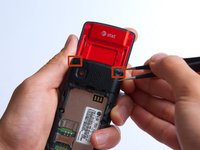
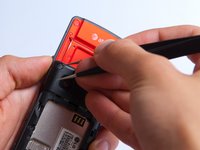
Remove the two screw covers at the top of phone with tweezers.
-
-
-
-
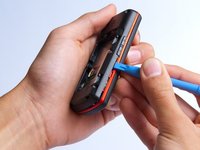
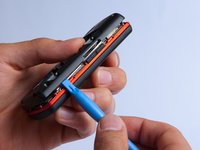
Use the plastic opening tool to pry the back cover off. Insert the tool between the back cover and red mid section and go around the entire phone.
-
-
-
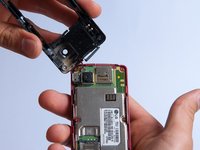
Use the tweezers to remove the red and black wires connecting the speaker to the green motherboard by pinching the sides of the plastic base near the motherboard.
-
Set the back cover with the speaker aside.
-
-





To reassemble your device, follow these instructions in reverse order.

Team

Cal Poly, Team 4-27, Amido Fall 2013 Member of Cal Poly, Team 4-27, Amido Fall 2013
CPSU-AMIDO-F13S4G27
4 Members
96 Guides authored
