Free Shipping on Domestic Orders $75+

LG 1010 LCD Screen Replacement

What you need

  1. LG 1010 LCD Screen Replacement, Battery: step 1, image 1 of 1
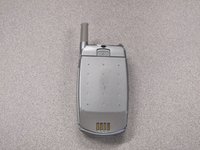
    • Turn off the cell phone and place face down on a flat surface.

    Ask FixBot
    Add Comment

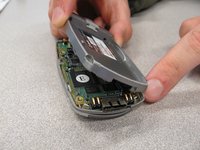
  2. LG 1010 LCD Screen Replacement: step 2, image 1 of 2 LG 1010 LCD Screen Replacement: step 2, image 2 of 2
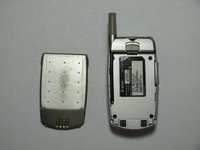
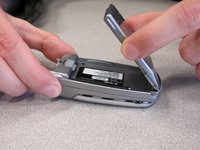
    • While sliding the gray tab up, lift battery up and away from the cell phone.

    Ask FixBot
    Add Comment

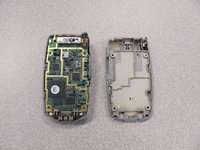
  3. LG 1010 LCD Screen Replacement: step 3, image 1 of 3 LG 1010 LCD Screen Replacement: step 3, image 2 of 3 LG 1010 LCD Screen Replacement: step 3, image 3 of 3
    • Remove battery and set aside.

    Ask FixBot

    Add Comment

  4. LG 1010 LCD Screen Replacement, Front  Cover: step 4, image 1 of 2 LG 1010 LCD Screen Replacement, Front  Cover: step 4, image 2 of 2
    • Use a Spudger to remove the two front plastic covers to reveal screws.

    Ask FixBot

    Add Comment

  5. LG 1010 LCD Screen Replacement: step 5, image 1 of 1
    • Remove two screws using a Torx T6 screwdriver.

    Ask FixBot

    Add Comment

  6. LG 1010 LCD Screen Replacement: step 6, image 1 of 2 LG 1010 LCD Screen Replacement: step 6, image 2 of 2
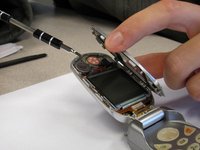
    • Pry off the screen front cover with a small flathead screwdriver.

    Ask FixBot

    Add Comment

  7. LG 1010 LCD Screen Replacement: step 7, image 1 of 1
    • Insert a small flathead screwdriver into the hinge and separate hinge connection.

    Ask FixBot

    Add Comment

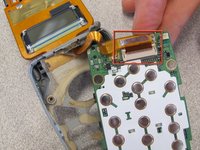
  8. LG 1010 LCD Screen Replacement: step 8, image 1 of 1
    • Pry off the speaker which is glued on to the front cover using a small flathead screwdriver.

    Ask FixBot
    Add Comment

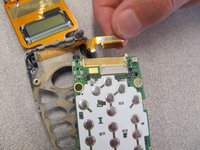
  9. LG 1010 LCD Screen Replacement: step 9, image 1 of 1
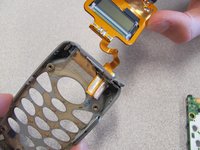
    • Remove remaining portion of the front case from the flexible circuit board.

    • Do not attempt to remove the LCD board at this time, as it is attached to the rear panel assembly.

    Ask FixBot
    Add Comment

  10. LG 1010 LCD Screen Replacement, Back Cover: step 10, image 1 of 2 LG 1010 LCD Screen Replacement, Back Cover: step 10, image 2 of 2
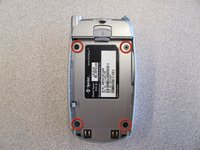
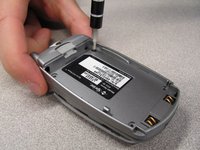
    • Unscrew the four screws on the back case using a T6 Torx Screwdriver.

    Ask FixBot

    Add Comment

  11. LG 1010 LCD Screen Replacement: step 11, image 1 of 2 LG 1010 LCD Screen Replacement: step 11, image 2 of 2
    • Pull the back cover straight off the phone using your thumb and forefinger.

    Ask FixBot

    Add Comment

  12. LG 1010 LCD Screen Replacement, Keypad: step 12, image 1 of 1
    • Pry off circuit board with a flathead screwdriver.

    Ask FixBot

    Add Comment

  13. LG 1010 LCD Screen Replacement: step 13, image 1 of 1
    • Pull out flexible keypad.

    Ask FixBot

    Add Comment

  14. LG 1010 LCD Screen Replacement, LCD Screen: step 14, image 1 of 1
    • The phone should now look like the picture to the left.

    Ask FixBot

    Add Comment

  15. LG 1010 LCD Screen Replacement: step 15, image 1 of 2 LG 1010 LCD Screen Replacement: step 15, image 2 of 2
    • Locate and detach the ribbon cable from circuit board.

    Ask FixBot

    Add Comment

  16. LG 1010 LCD Screen Replacement: step 16, image 1 of 2 LG 1010 LCD Screen Replacement: step 16, image 2 of 2
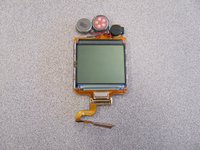
    • Remove the LCD Screen from the phone case and replace with a new LCD screen.

    Ask FixBot

    Add Comment

Conclusion

To reassemble your device, follow these instructions in reverse order.

Cancel: I did not complete this guide.

2 other people completed this guide.

Nicholas Schmidt

Member since: 10/09/10

97 Reputation

7 Guides authored

Team

Cal Poly, Team 3-25, Regan Fall 2010 Member of Cal Poly, Team 3-25, Regan Fall 2010

CPSU-REGAN-F10S3G25

4 Members

21 Guides authored

0 Guide Comments

Add Comment

View Statistics:

Past 24 Hours: 0

Past 7 Days: 8

Past 30 Days: 41

All Time: 1,353