Free Shipping on Domestic Orders $75+

LG 1010 Keypad Replacement

Views: 1.5K

View statistics:

Past 24 Hours:
3
Past 7 Days:
15
Past 30 Days:
101
All Time:
1,477
Comments: 0

No one has left comments on this guide. Will you be first?

Go to guide comments
Completed: 2

2 people have marked this guide "completed." Will you be next?

Favorites: 0

No one has favorited (and subscribed to) this guide. Will you be the first?

Time Required: 5 - 10 minutes
Difficulty: Moderate
Incorrect Tools

Help make this guide better by using the correct tools in images and/or text.

LG 1010 Keypad Replacement

Introduction

Go to step 1 ↓

This repair guide will instruct the user on the proper technique for removing and replacing a broken keypad for a LG 1010 Cell Phone.

What you need

Tools

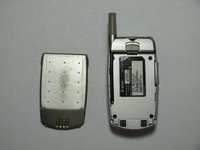
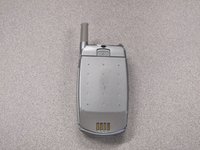
    1. LG 1010 Keypad Replacement, Battery: step 1, image 1 of 1
      • Turn off the cell phone and place face down on a flat surface.

      Ask FixBot

      Add Comment

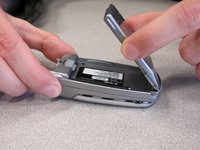
    2. LG 1010 Keypad Replacement: step 2, image 1 of 2 LG 1010 Keypad Replacement: step 2, image 2 of 2
      • While sliding the gray tab up, lift battery up and away from the cell phone.

      Ask FixBot

      Add Comment

    3. LG 1010 Keypad Replacement: step 3, image 1 of 3 LG 1010 Keypad Replacement: step 3, image 2 of 3 LG 1010 Keypad Replacement: step 3, image 3 of 3
      • Remove battery and set aside.

      Ask FixBot

      Add Comment

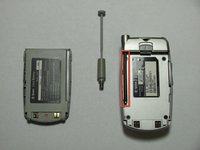
    1. LG 1010 Keypad Replacement, Antenna: step 4, image 1 of 1
      • While holding cell phone firmly in one hand, unscrew and remove the antenna with the other hand.

      Ask FixBot

      Add Comment

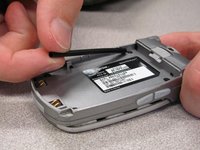
    2. LG 1010 Keypad Replacement: step 5, image 1 of 2 LG 1010 Keypad Replacement: step 5, image 2 of 2
      • Pull the antenna housing (black tube) towards bottom of phone and remove.

      Ask FixBot

      Add Comment

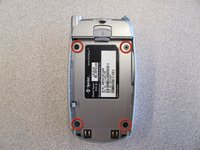
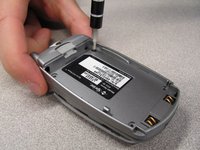
    1. LG 1010 Keypad Replacement, Back Cover: step 6, image 1 of 2 LG 1010 Keypad Replacement, Back Cover: step 6, image 2 of 2
      • Unscrew the four screws on the back case using a T6 Torx Screwdriver.

      Ask FixBot

      Add Comment

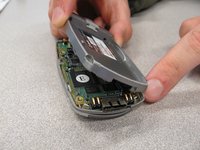
    2. LG 1010 Keypad Replacement: step 7, image 1 of 2 LG 1010 Keypad Replacement: step 7, image 2 of 2
      • Pull the back cover straight off the phone using your thumb and forefinger.

      Ask FixBot

      Add Comment

    1. LG 1010 Keypad Replacement, Keypad: step 8, image 1 of 1
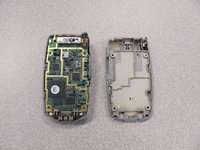
      • Pry off circuit board with a flathead screwdriver.

      Ask FixBot

      Add Comment

    2. LG 1010 Keypad Replacement: step 9, image 1 of 1
      • Pull out flexible keypad.

      Ask FixBot

      Add Comment

Conclusion

Install new keypad and reassemble following these instructions in reverse order.

Cancel: I did not complete this guide.

2 other people completed this guide.

Nicholas Schmidt

Member since: 10/09/10

97 Reputation

7 Guides authored

Team

Cal Poly, Team 3-25, Regan Fall 2010 Member of Cal Poly, Team 3-25, Regan Fall 2010

CPSU-REGAN-F10S3G25

4 Members

84 Guides authored

0 Guide Comments

Add Comment

View Statistics:

Past 24 Hours: 3

Past 7 Days: 15

Past 30 Days: 101

All Time: 1,477