Free Shipping on Domestic Orders $75+

Kyocera Hydro Life SIM Card Replacement

What you need

    1. Kyocera Hydro Life SIM Card Replacement, SIM Card: step 1, image 1 of 1
      • Remove back cover of the phone.

      • The back cover has a gap to grip when removing the cover.

      Ask FixBot

      Add Comment

    2. Kyocera Hydro Life SIM Card Replacement: step 2, image 1 of 1
      • Then remove the battery.

      • Lift the battery from the bottom of the phone to remove.

      Ask FixBot

      Add Comment

    3. Kyocera Hydro Life SIM Card Replacement: step 3, image 1 of 1
      • Remove the sim card.

      • Data will be lost from replacing the sim card.

      Ask FixBot

      Add Comment

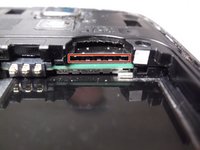
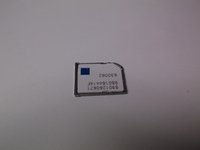
    4. Kyocera Hydro Life SIM Card Replacement: step 4, image 1 of 2 Kyocera Hydro Life SIM Card Replacement: step 4, image 2 of 2
      • Insert a new sim card.

      • The sim card goes in the bottom slot—below the SD card slot.

      Ask FixBot

      Add Comment

Conclusion

To reassemble your device, follow these instructions in reverse order.

Cancel: I did not complete this guide.

Morgan Marshall

Member since: 09/21/18

277 Reputation

2 Guides authored

0 Guide Comments

Add Comment

View Statistics:

Past 24 Hours: 3

Past 7 Days: 6

Past 30 Days: 34

All Time: 1,019