Free Shipping on Domestic Orders $75+

Kurio Touch 4S Speaker Replacement

What you need

  1. Kurio Touch 4S Speaker  Replacement, Speakers: step 1, image 1 of 1
    • Make sure to open the back cover easily using the plastic opening tool.

    Ask FixBot

    Add Comment

  2. Kurio Touch 4S Speaker  Replacement: step 2, image 1 of 3 Kurio Touch 4S Speaker  Replacement: step 2, image 2 of 3 Kurio Touch 4S Speaker  Replacement: step 2, image 3 of 3
    • Remove back cover by prying away from the device.

    • The easiest place to remove the cover is from the bottom and top; try to open it from the right and left sides.

    • Open it gently. Do not open it with too much pressure, so that the plastic back cover do not break.

    Ask FixBot

    Add Comment

  3. Kurio Touch 4S Speaker  Replacement: step 3, image 1 of 2 Kurio Touch 4S Speaker  Replacement: step 3, image 2 of 2
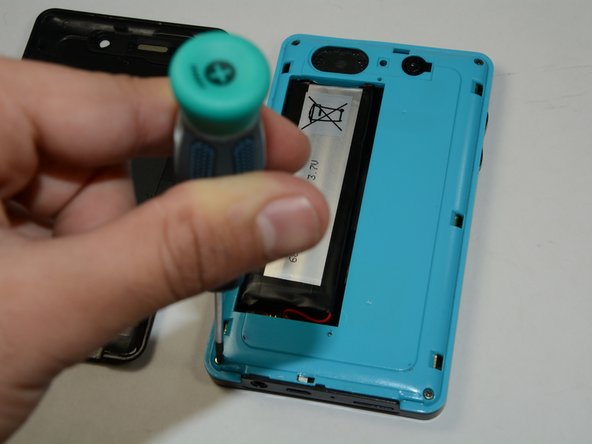
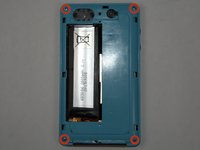
    • To remove the battery, make sure the four 5mm Philips screws on each side of your device is open using the Phillips #1 Screwdriver

    • After you remove your four 5mm Philips screws, use your plastic opening tool to help you open the plastic cover of your device.

    Ask FixBot

    Add Comment

  4. Kurio Touch 4S Speaker  Replacement: step 4, image 1 of 1
    • After you remove your four 5mm Philips screws, use your plastic opening tool to help you open the plastic cover of your device.

    Ask FixBot

    Add Comment

  5. Kurio Touch 4S Speaker  Replacement: step 5, image 1 of 1
    • Gently remove the plastic cover that is covering the camera.

    Ask FixBot

    Add Comment

  6. Kurio Touch 4S Speaker  Replacement: step 6, image 1 of 1
    • Separate the two halves of your Kurio Touch 4S and lay them besides each other.

    Ask FixBot

    Add Comment

  7. Kurio Touch 4S Speaker  Replacement: step 7, image 1 of 1
    • Use the soldering tool to detach the speaker wires.

    • For more information on how to solder the wires Click here

    Ask FixBot

    Add Comment

  8. Kurio Touch 4S Speaker  Replacement: step 8, image 1 of 1
    • Press the speaker in the manner shown so that it comes out of its slot.

    • Be sure not to apply too much force or you can break the back cover.

    Ask FixBot

    Add Comment

  9. Kurio Touch 4S Speaker  Replacement: step 9, image 1 of 1
    Tool used on this step:
    Tweezers
    $4.99
    Buy
    • Use the Tweezers to remove the speaker from its place.

    • Remove the speaker gently.

    Ask FixBot

    Add Comment

Conclusion

To reassemble your device, follow these instructions in reverse order.

Cancel: I did not complete this guide.

One other person completed this guide.

Moin Khan

Member since: 01/21/15

234 Reputation

2 Guides authored

Team

USF Tampa, Team 6-5, Brown Winter 2015 Member of USF Tampa, Team 6-5, Brown Winter 2015

USFT-BROWN-W15S6G5

3 Members

10 Guides authored

0 Guide Comments

Add Comment

View Statistics:

Past 24 Hours: 0

Past 7 Days: 2

Past 30 Days: 24

All Time: 329