Free Shipping on Domestic Orders $75+

Kodak EasyShare M381 Lens/Optics Replacement

What you need

  1. Kodak EasyShare M381 Lens/Optics Replacement, Battery: step 1, image 1 of 2 Kodak EasyShare M381 Lens/Optics Replacement, Battery: step 1, image 2 of 2
    • First, press in and slide forward the battery latch as indicated by the arrow.

  2. Kodak EasyShare M381 Lens/Optics Replacement: step 2, image 1 of 1
    • Press down on battery until you hear a click and release it. Battery should easily slide out.

  3. Kodak EasyShare M381 Lens/Optics Replacement, Screen: step 3, image 1 of 1
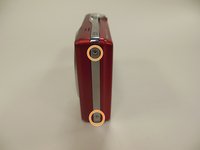
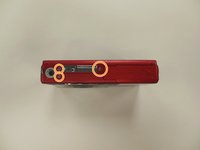
    • Remove the two 3.85 mm screws on the bottom right of the camera, as indicated.

  4. Kodak EasyShare M381 Lens/Optics Replacement: step 4, image 1 of 1
    • Remove dial button located on top of camera, by gently pulling up.

  5. Kodak EasyShare M381 Lens/Optics Replacement: step 5, image 1 of 2 Kodak EasyShare M381 Lens/Optics Replacement: step 5, image 2 of 2
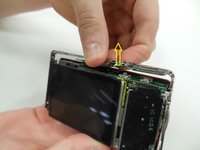
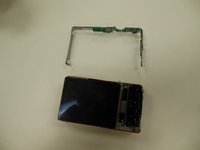
    • Starting at one side, carefully work the chrome frame off of the camera itself.

    • Be careful not to disturb the shutter or flash buttons on top of the camera.

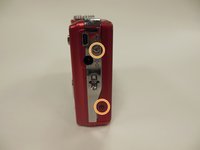
  6. Kodak EasyShare M381 Lens/Optics Replacement: step 6, image 1 of 1
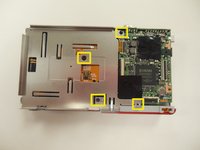
    • On the right side of the camera, locate and remove the two 3.25 mm screws as highlighted.

  7. Kodak EasyShare M381 Lens/Optics Replacement: step 7, image 1 of 3 Kodak EasyShare M381 Lens/Optics Replacement: step 7, image 2 of 3 Kodak EasyShare M381 Lens/Optics Replacement: step 7, image 3 of 3
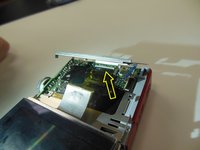
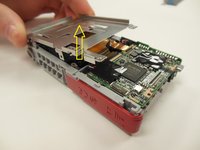
    • Carefully lift the motherboard panel up, pulling towards the left. Make sure you do not rip the blue ribbon.

    • Using a plastic opening tool, gently lift up on the ribbon fastener until it is in an upright position.

    • Slide panel away from camera.

  8. Kodak EasyShare M381 Lens/Optics Replacement: step 8, image 1 of 2 Kodak EasyShare M381 Lens/Optics Replacement: step 8, image 2 of 2
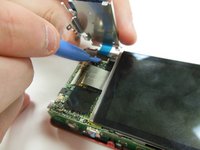
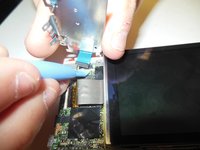
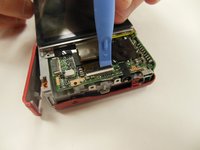
    • Using a plastic opening tool, gently lift ribbon clamp as indicated to remove the screen ribbon from the motherboard.

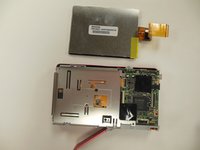
    • Screen should now be detached. Gently lift it away from the base of the camera.

  9. Kodak EasyShare M381 Lens/Optics Replacement, Back Panel Frame: step 9, image 1 of 3 Kodak EasyShare M381 Lens/Optics Replacement, Back Panel Frame: step 9, image 2 of 3 Kodak EasyShare M381 Lens/Optics Replacement, Back Panel Frame: step 9, image 3 of 3
    • Remove the 3.9 mm frame screws using a Phillips #00 screwdriver.

    • Using a magnetized surface to keep from losing screws may be very helpful.

  10. Kodak EasyShare M381 Lens/Optics Replacement: step 10, image 1 of 2 Kodak EasyShare M381 Lens/Optics Replacement: step 10, image 2 of 2
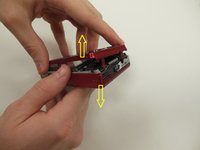
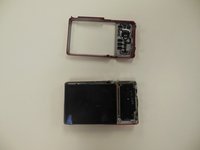
    • Using both hands, carefully pull the frame apart from the camera.

  11. Kodak EasyShare M381 Lens/Optics Replacement, Lens/Optics: step 11, image 1 of 3 Kodak EasyShare M381 Lens/Optics Replacement, Lens/Optics: step 11, image 2 of 3 Kodak EasyShare M381 Lens/Optics Replacement, Lens/Optics: step 11, image 3 of 3
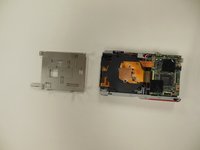
    • Locate and remove the four 3.25 mm screws securing the back panel to the frame of the camera using the Phillips #00 screwdriver.

    • Lift up and remove panel, detaching it from the camera frame.

  12. Kodak EasyShare M381 Lens/Optics Replacement: step 12, image 1 of 2 Kodak EasyShare M381 Lens/Optics Replacement: step 12, image 2 of 2
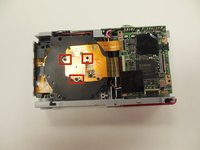
    • Remove the three 3.25 mm screws securing the hexagon-shaped, copper panel to the optical device.

    • Gently peel back the main optic ribbon, ensuring it is securely out of the way.

    • This ribbon is very fragile, and, if torn, the camera will not function properly. Handle with care.

  13. Kodak EasyShare M381 Lens/Optics Replacement: step 13, image 1 of 1
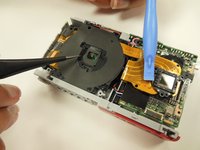
    • Remove the six 3.25 mm screws securing the optic lens to the camera frame.

  14. Kodak EasyShare M381 Lens/Optics Replacement: step 14, image 1 of 2 Kodak EasyShare M381 Lens/Optics Replacement: step 14, image 2 of 2
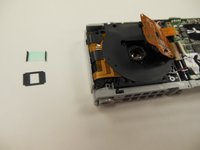
    • Carefully remove the square lens film, ensuring you do not bend it. This film will be in two pieces: a black cover, and a glass square piece. It is very fragile, so handle with care.

    • This film is very fragile. Handle with care.

  15. Kodak EasyShare M381 Lens/Optics Replacement: step 15, image 1 of 2 Kodak EasyShare M381 Lens/Optics Replacement: step 15, image 2 of 2
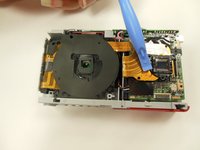
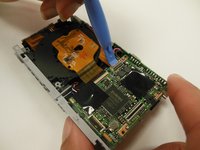
    • There is a small ribbon attaching the optical lens piece to the motherboard. Using a plastic opening tool, gently lift up on this ribbon's clamp, detaching it from the motherboard.

  16. Kodak EasyShare M381 Lens/Optics Replacement: step 16, image 1 of 3 Kodak EasyShare M381 Lens/Optics Replacement: step 16, image 2 of 3 Kodak EasyShare M381 Lens/Optics Replacement: step 16, image 3 of 3
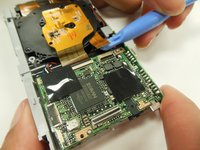
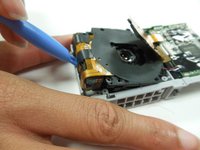
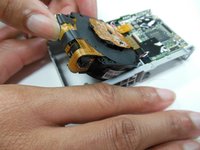
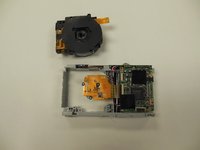
    • The optic assembly should now be free. Use a pry tool to lift it far enough up that you can grab and remove it.

    • Be sure the detached ribbons are held out of the way to avoid any possible damage to them.

Conclusion

To reassemble your device, follow these instructions in reverse order.

1 Guide Comment

I'm with ya up 'til step 2. The right hand back of my camera has controls (zoom in/out, trash/list/info, right/left/up/down, etc. on it and no visible screws as in your step 3 picture. It appears that another panel has been removed to expose these screws. Can you elaborate?

moe_r - Reply Share
Add Comment

View Statistics:

Past 24 Hours: 1

Past 7 Days: 11

Past 30 Days: 36

All Time: 1,102