Free Shipping on Domestic Orders $75+

Kodak EasyShare M381 Button Replacement

What you need

  1. Kodak EasyShare M381 Button Replacement, Battery: step 1, image 1 of 2 Kodak EasyShare M381 Button Replacement, Battery: step 1, image 2 of 2
    • First, press in and slide forward the battery latch as indicated by the arrow.

    Ask FixBot

    Add Comment

  2. Kodak EasyShare M381 Button Replacement: step 2, image 1 of 1
    • Press down on battery until you hear a click and release it. Battery should easily slide out.

    Ask FixBot

    Add Comment

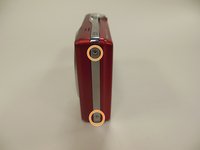
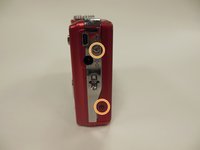
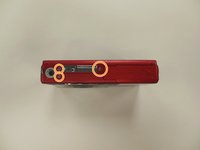
  3. Kodak EasyShare M381 Button Replacement, Back Panel Frame: step 3, image 1 of 3 Kodak EasyShare M381 Button Replacement, Back Panel Frame: step 3, image 2 of 3 Kodak EasyShare M381 Button Replacement, Back Panel Frame: step 3, image 3 of 3
    • Remove the 3.9 mm frame screws using a Phillips #00 screwdriver.

    • Using a magnetized surface to keep from losing screws may be very helpful.

    Ask FixBot

    Add Comment

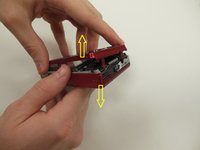
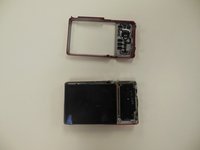
  4. Kodak EasyShare M381 Button Replacement: step 4, image 1 of 2 Kodak EasyShare M381 Button Replacement: step 4, image 2 of 2
    • Using both hands, carefully pull the frame apart from the camera.

    Ask FixBot

    Add Comment

  5. Kodak EasyShare M381 Button Replacement, Button: step 5, image 1 of 1
    • Carefully pick up frame and push upward on buttons.

    Ask FixBot

    Add Comment

  6. Kodak EasyShare M381 Button Replacement: step 6, image 1 of 1
    • Clean and replace as needed.

    • A microfiber cloth, or any other type of electronic cloth may be used to clean them if desire.

    Ask FixBot

    Add Comment

Conclusion

To reassemble your device, follow these instructions in reverse order.

Cancel: I did not complete this guide.

0 Guide Comments

Add Comment

View Statistics:

Past 24 Hours: 2

Past 7 Days: 8

Past 30 Days: 28

All Time: 578