Introduction
This guide will help you gain access to the camera of the Kocaso M750B. Before considering repair make sure to visit the Kocaso M750B Troubleshooting page to make sure a replacement is necessary. Also make sure to work carefully because there are many parts that when damaged, are dangerous and costly.
What you need
-
-
-
-
Pry the battery up using the flat end of a spudger.
-
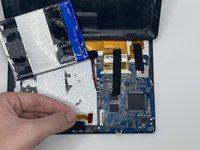
Remove the adhesive under the battery and carefully lift it up.
-
-
-
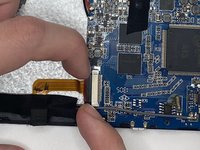
Detach the ribbon cable connecting the camera to the motherboard.
-
Gently pull on the black strip away from the motherboard. Once you hear a slight click, the ribbon cable should now come loose.
-
You can now remove the camera.
-
-


 Ask FixBot


To reassemble your device, follow these instructions in reverse order.

Team

University of North Texas, Team 4-9, Harold Fall 2023 Member of University of North Texas, Team 4-9, Harold Fall 2023
UNT-HAROLD-F23S4G9
4 Members
72 Guides authored
