Free Shipping on Domestic Orders $75+

Kobo Clara Colour (N367B) Back Cover Replacement

Views: 549

View statistics:

Past 24 Hours:
4
Past 7 Days:
14
Past 30 Days:
63
All Time:
549
Comments: 0

No one has left comments on this guide. Will you be first?

Go to guide comments
Completed: 0

No one has marked this guide "completed." Will you be the first?

Favorites: 0

No one has favorited (and subscribed to) this guide. Will you be the first?

Time Required: 3 - 5 minutes
Difficulty: Moderate
OEM Guide

iFixit collaborated with the manufacturer to make this guide.

Kobo Clara Colour (N367B) Back Cover Replacement

Introduction

Go to step 1 ↓

Use this guide to replace the back cover on your Kobo Clara Colour (N367B model) eReader.

Important: There are two Clara Colour versions: N367 and N367B. Check your eReader's model number (printed near the bottom of the rear case) before starting this guide. This guide is for the N367B model.

The back cover includes the external power button.

Note: Replacement back covers don't have a printed serial number, so you'll have to refer to your eReader's internal settings for your serial number after this repair.

Kobo supports their eReaders with a warranty. If your device is still under warranty, Kobo may be able to help. Before starting a repair, review your warranty information or check support documentation.

Note: Some photos used in this guide are of different Kobo Clara models. Any slight visual discrepancies won't affect the guide procedure.

What you need

Tools

    1. Kobo Clara Colour (N367B) Back Cover Replacement, Before you begin: step 1, image 1 of 3 Kobo Clara Colour (N367B) Back Cover Replacement, Before you begin: step 1, image 2 of 3 Kobo Clara Colour (N367B) Back Cover Replacement, Before you begin: step 1, image 3 of 3
      • Drain your eReader's battery as much as possible before starting your repair. Ideally, it should be fully discharged.

      • Optionally, to drain the battery faster, navigate to More → Settings → Energy saving and privacy and set Automatically go to sleep after and Automatically power off after to Never.

      • When working on or near the battery, don't use sharp metal tools to avoid puncturing and shorting the battery.

      • Unplug all cables and fully shut down your eReader.

      • Your screen should be black and say Powered off.

      Ask FixBot

      Add Comment

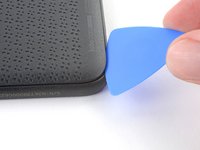
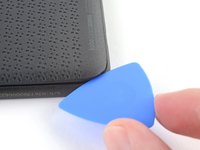
    1. Kobo Clara Colour (N367B) Back Cover Replacement, Insert an opening pick: step 2, image 1 of 2 Kobo Clara Colour (N367B) Back Cover Replacement, Insert an opening pick: step 2, image 2 of 2
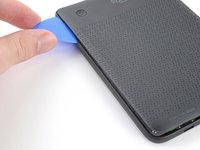
      • Lay your eReader down so the back cover is facing up.

      • Insert the flat edge of an opening pick between the frame and the bottom left corner of the back cover.

      • Push the pick downwards at a slight angle until it slides under the back cover.

      Ask FixBot

      Add Comment

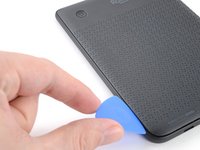
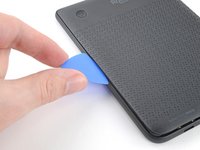
    2. Kobo Clara Colour (N367B) Back Cover Replacement, Release the bottom clips: step 3, image 1 of 3 Kobo Clara Colour (N367B) Back Cover Replacement, Release the bottom clips: step 3, image 2 of 3 Kobo Clara Colour (N367B) Back Cover Replacement, Release the bottom clips: step 3, image 3 of 3
      • Slide the pick toward the bottom right corner to release the clips along the bottom edge.

      Ask FixBot

      Add Comment

    3. Kobo Clara Colour (N367B) Back Cover Replacement: step 4, image 1 of 2 Kobo Clara Colour (N367B) Back Cover Replacement: step 4, image 2 of 2
      • Remove the pick and reinsert it under the bottom left corner.

      • Angle the pick flat under the back cover and rotate it around the bottom left corner to release its clips.

      • If you're having trouble, try twisting the pick to lift the corner clips out of their slots.

      Ask FixBot

      Add Comment

    4. Kobo Clara Colour (N367B) Back Cover Replacement, Release the left clips: step 5, image 1 of 3 Kobo Clara Colour (N367B) Back Cover Replacement, Release the left clips: step 5, image 2 of 3 Kobo Clara Colour (N367B) Back Cover Replacement, Release the left clips: step 5, image 3 of 3
      • Slide the pick toward the top left corner to release the clips along the left edge.

      Ask FixBot

      Add Comment

    5. Kobo Clara Colour (N367B) Back Cover Replacement, Remove the back cover: step 6, image 1 of 3 Kobo Clara Colour (N367B) Back Cover Replacement, Remove the back cover: step 6, image 2 of 3 Kobo Clara Colour (N367B) Back Cover Replacement, Remove the back cover: step 6, image 3 of 3
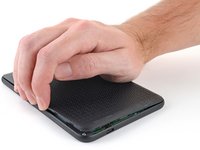
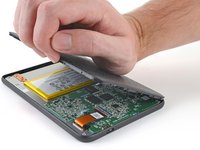
      • At this point, you should be able to grip the back cover and release its remaining clips. If not, slide a pick under the perimeter of the back cover until you can grip an edge.

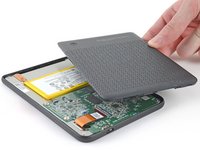
      • Grip the left edge of the back cover and lift it away from the eReader to release the remaining clips.

      • Remove the back cover.

      • During reassembly, align the back cover over the eReader and press along the perimeter until all its clips snap back into place.

      Ask FixBot

      Add Comment

Conclusion

Repair didn’t go as planned? Try some basic troubleshooting, or ask our Answers Community for help.

Cancel: I did not complete this guide.

Carsten Frauenheim

Member since: 03/10/20

173,403 Reputation

442 Guides authored

0 Guide Comments

Add Comment

View Statistics:

Past 24 Hours: 4

Past 7 Days: 14

Past 30 Days: 63

All Time: 549