Free Shipping on Domestic Orders $75+

Kindle Voyage Ambient Light Sensor Replacement

What you need

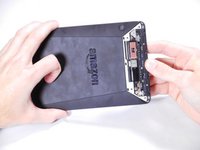
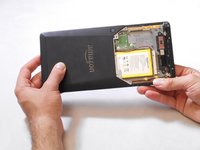
  1. Kindle Voyage Ambient Light Sensor Replacement, Back Panel: step 1, image 1 of 2 Kindle Voyage Ambient Light Sensor Replacement, Back Panel: step 1, image 2 of 2
    • Insert a plastic opening tool between the plastic panel shown on the device.

    • Use the tool to pry the plastic away from the device.

    • There will be adhesive holding this piece of plastic to the device. You may have to pull pretty hard to get it separated.

    Ask FixBot

    Add Comment

  2. Kindle Voyage Ambient Light Sensor Replacement: step 2, image 1 of 1
    • Use an aluminum driver attached with a Phillips head size #00 to remove the four 3mm screws shown in the picture. For reassembly, note that the top two and bottom two screws are different sizes.

    Ask FixBot

    Add Comment

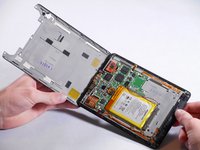
  3. Kindle Voyage Ambient Light Sensor Replacement: step 3, image 1 of 3 Kindle Voyage Ambient Light Sensor Replacement: step 3, image 2 of 3 Kindle Voyage Ambient Light Sensor Replacement: step 3, image 3 of 3
    • Once the screws are removed, the back panel can slide off the device.

    Ask FixBot

    Add Comment

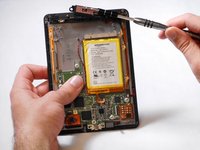
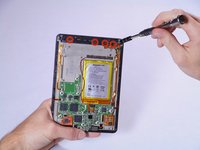
  4. Kindle Voyage Ambient Light Sensor Replacement: step 4, image 1 of 2 Kindle Voyage Ambient Light Sensor Replacement: step 4, image 2 of 2
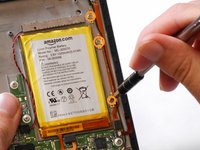
    • Remove the magnetic component with the magnetic head of the aluminum driver.

    Ask FixBot

    Add Comment

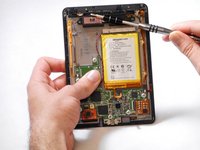
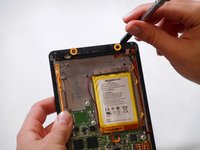
  5. Kindle Voyage Ambient Light Sensor Replacement, Wifi Antenna: step 5, image 1 of 2 Kindle Voyage Ambient Light Sensor Replacement, Wifi Antenna: step 5, image 2 of 2
    • Use an aluminum driver with Phillips head #00 to remove the four 3 mm screws shown in the picture.

    • Use the same driver to remove the two 2.5 mm screws.

    Ask FixBot

    Add Comment

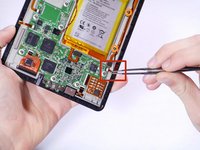
  6. Kindle Voyage Ambient Light Sensor Replacement: step 6, image 1 of 3 Kindle Voyage Ambient Light Sensor Replacement: step 6, image 2 of 3 Kindle Voyage Ambient Light Sensor Replacement: step 6, image 3 of 3
    Tool used on this step:
    Tweezers
    $4.99
    Buy
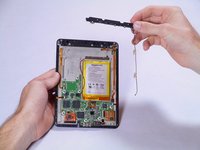
    • Using the tweezers, undo the attached clip.

    • Remove the three 3 mm screws holding down the rest of the antenna with an aluminum driver and the Phillips #00 head.

    • You should now be able to simply take the WiFi bar off of the device.

    Ask FixBot

    Add Comment

  7. Kindle Voyage Ambient Light Sensor Replacement, Ambient Light Sensor: step 7, image 1 of 2 Kindle Voyage Ambient Light Sensor Replacement, Ambient Light Sensor: step 7, image 2 of 2
    Tool used on this step:
    Tweezers
    $4.99
    Buy
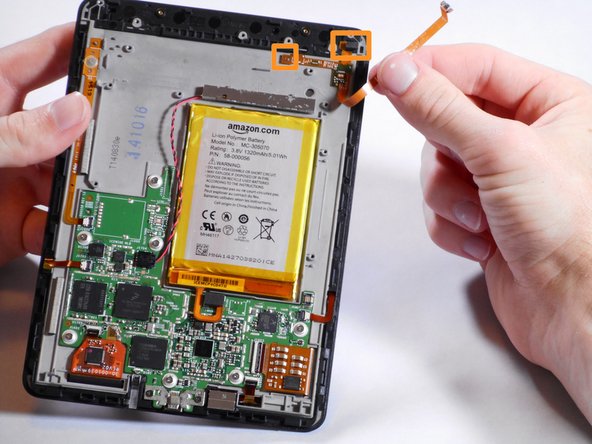
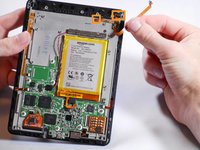
    • Gently remove the connector to the motherboard using tweezers.

    • Continue to carefully pull the rest of the connector from the adhesive connecting it to the Voyage.

    • Detach sensor from the top using fingers

    Ask FixBot

    Add Comment

Conclusion

To reassemble your device, follow these instructions in reverse order.

Cancel: I did not complete this guide.

One other person completed this guide.

Sean Yap

Member since: 01/22/15

1,508 Reputation

6 Guides authored

Team

Cal Poly, Team 19-12, Maness Winter 2015 Member of Cal Poly, Team 19-12, Maness Winter 2015

CPSU-MANESS-W15S19G12

5 Members

13 Guides authored

1 Guide Comment

If i do this wiithout putting the lightsensor back on, can i then use the kindle without light ?

Best regards

Lasse

Beck - Reply Share

Add Comment

View Statistics:

Past 24 Hours: 3

Past 7 Days: 12

Past 30 Days: 59

All Time: 3,133