
Kindle Touch 3G Card Housing Replacement

Adam Yerly and 3 other contributors
Last updated on Dec 29, 2015
Views: 3.3K
View statistics:
- Past 24 Hours:
- 5
- Past 7 Days:
- 23
- Past 30 Days:
- 95
- All Time:
- 3,267
Comments: 6
4 comments on steps, 2 guide comments.
Go to guide commentsCompleted: 3 4
3 people have marked this guide "completed." Will you be next?
4 people have marked this guide "completed." Including you — great job!
Favorites: 0 1
No one has favorited (and subscribed to) this guide. Will you be the first?
1 person has favorited (and subscribed to) this guide — and that's you!
Introduction
Go to step 1 ↓Next to the battery is the 3G unit. However, in the
models that are WiFi only, there will instead be a plastic placeholder instead. The replacement instructions for both are identical.
What you need
Tools
-
Spudger4.9


Video Overview
-
-
-
Use the plastic opening tool to undo the six plastic clips around the bottom of the back panel of the Kindle.
 Ask FixBot
-
-
-
Slide the back panel downward, toward the charging port. This will release the clips on the top half.
-
Once the top clips release, gently lift the back panel away.
-
-
-
-
-
-
-
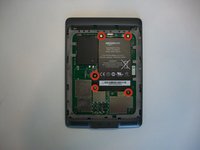
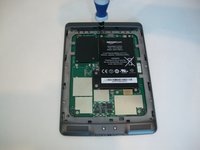
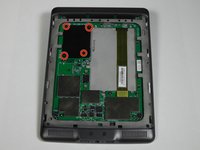
Remove the indicated four 2 mm screws with a Phillips #00 screwdriver. (Units with the 3G assembly have Phillips #000 screws.)
-
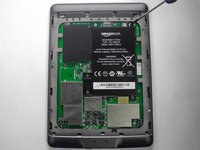
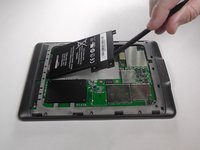
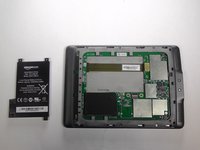
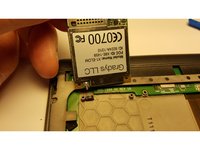
Next, gently lift the 3G assembly with a Spudger or your fingers.
-
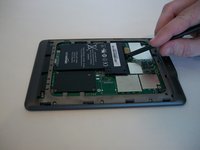
Disconnect the antenna lead by carefully prying it off the 3G board with a plastic tool.
-
-






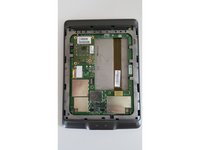
To reassemble your device, follow these instructions in reverse order.
Cancel: I did not complete this guide.
3 other people completed this guide.

Team

USF Tampa, Team 19-5, Blackwell Winter 2015 Member of USF Tampa, Team 19-5, Blackwell Winter 2015
USFT-BLACKWELL-W15S19G5
3 Members
96 Guides authored
2 Guide Comments
Hey, thanks for your guide!
I, however, have one question, maybe I misunderstood - is it possible to add a 3G module to a kindle touch that didn't have one installed by default?
Would it work?
You would need to add more than just a 3G module - there’s a slot for a SIM-card tray and special Amazon SIM that are missing from non-3G Kindle Touches. I don’t know if there would be any software changes that would need making.
