
Kindle Fire HD 10 Battery Replacement

Jonathan Stewart and 8 other contributors
Last updated on Mar 22, 2026
Views: 31K
View statistics:
- Past 24 Hours:
- 6
- Past 7 Days:
- 66
- Past 30 Days:
- 302
- All Time:
- 30,968
Comments: 16
11 comments on steps, 5 guide comments.
Go to guide commentsCompleted: 14 15
14 people have marked this guide "completed." Will you be next?
15 people have marked this guide "completed." Including you — great job!
Favorites: 1 2
1 person has favorited (and subscribed to) this guide. Will you be next?
2 people have favorited (and subscribed to) this guide — including you!
Introduction
Go to step 1 ↓This guide shows how to replace your Kindle Fire HD 10 (7th Generation) Battery.
The batteries wear out over time due to repeated charging cycles. If you notice a decrease in performance from your battery, you may need to replace your battery. For further information look at this link below:
Warning: before you start working on replacing your battery, make sure your Kindle Fire HD 10 device is turned off and the charger is disconnected.
What you need


-
-
-
Pry open the case using the iFixit opening tool. Make sure to go around the whole case before removing the whole case.
 Ask FixBot
-
-
Tool used on this step:Tweezers$4.99
-
Remove the plastic yellow taping from the wire circuits using a pair of tweezers.
-
-
-
-
Remove the ten 4mm screws from the outsides of the battery with a T5 screwdriver.
-
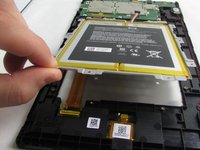
Lift out the battery from its resting position using your fingers.
-
-


To reassemble your device, follow these instructions in reverse order.
Cancel: I did not complete this guide.
14 other people completed this guide.

Team

Embry-Riddle Aeronautical University, Team S1-G5, Watkins Fall 2019 Member of Embry-Riddle Aeronautical University, Team S1-G5, Watkins Fall 2019
ERAU-WATKINS-F19S1G5
4 Members
60 Guides authored
5 Guide Comments
Probably amazon locking it because of their stupid repair practices, Is it possible to rip it off or unscrew it somehow and reattach it? Get back to me if that is a possibility
Two problems I have found so far. The first one is that the cover has some clips on the inside so you have to play with the cover until you can get them to release. Be careful as too much pressure will crack the screen. The second problem is that the battery is glued to the metal frame that you just removed the 4mm T4 Torx screws. Something that should take a few minutes has taken me a few days just to make sure I don't destroy the screen.
An addition to my previous post: I had to use a plastic kitchen spatula in order to separated the battery from the metal tray. It has two glue strips that were reused to hold the new battery pack in place. The old battery pack was totally destroyed and will be properly recycled. Now it's a struggle to get the case to mate with the screen and lock in place. so far only one side has mated properly. will keep trying until its done correctly.
I was thinking my battery may need changing as slow charging, but after reading all these comments, I may just buy a new tablet! May be cheaper than going to a shop to ask them to do it and they need it up.
