Free Shipping on Domestic Orders $75+

Keychron K3 V2 Battery Replacement

What you need

    1. Keychron K3 V2 Battery Replacement, Keycap: step 1, image 1 of 2 Keychron K3 V2 Battery Replacement, Keycap: step 1, image 2 of 2
      • Using a keycap remover, fingers, or a prying tool, gently pry the keycaps off of the keyboard

      Ask FixBot

      Add Comment

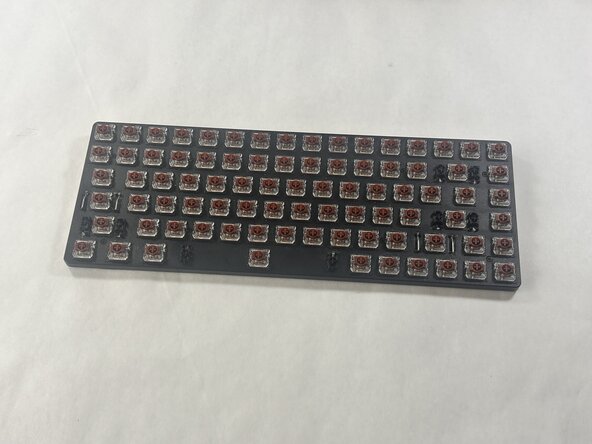
    2. Keychron K3 V2 Battery Replacement: step 2, image 1 of 1
      • Continue to pry the keys in the same manner as the previous step until all keys are removed.

      Ask FixBot

      Add Comment

    1. Keychron K3 V2 Battery Replacement, Battery: step 3, image 1 of 2 Keychron K3 V2 Battery Replacement, Battery: step 3, image 2 of 2
      • Use a screwdriver to remove all of the screws on the framing.

      Ask FixBot

      Add Comment

    2. Keychron K3 V2 Battery Replacement: step 4, image 1 of 2 Keychron K3 V2 Battery Replacement: step 4, image 2 of 2
      • Use an opening pick to pry open the framing.

      Ask FixBot

      Add Comment

    3. Keychron K3 V2 Battery Replacement: step 5, image 1 of 1
      • Remove the framing, being careful not to tear the wire that links both sides of the keyboard.

      Ask FixBot

      Add Comment

    4. Keychron K3 V2 Battery Replacement: step 6, image 1 of 1
      • Disconnect the wire connecting the framing and backplate.

      Ask FixBot

      Add Comment

    5. Keychron K3 V2 Battery Replacement: step 7, image 1 of 1
      • Remove the film from the top of the battery.

      Ask FixBot

      Add Comment

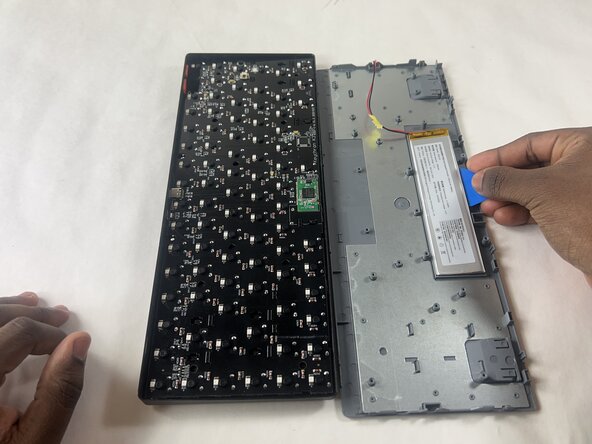
    6. Keychron K3 V2 Battery Replacement: step 8, image 1 of 2 Keychron K3 V2 Battery Replacement: step 8, image 2 of 2
      • Using a slow sawing motion, use an opening pick underneath the battery to lift it.

      • Avoid metal tools, as they can cause damage to the battery.

      • (Optional) You can use a hairdryer to heat up the adhesive, making it easier to take the battery off.

      Ask FixBot

      Add Comment

Conclusion

To reassemble your device, follow these instructions in reverse order.

Cancel: I did not complete this guide.

Dane Magpayo

Member since: 03/09/26

367 Reputation

2 Guides authored

Team

0 Guide Comments

Add Comment

View Statistics:

Past 24 Hours: 10

Past 7 Days: 62

Past 30 Days: 277

All Time: 817