
Jazz UltraTab C855 Battery Replacement

Cory Hodge and 2 other contributors
Last updated on Jan 5, 2016
Views: 957
View statistics:
- Past 24 Hours:
- 1
- Past 7 Days:
- 13
- Past 30 Days:
- 91
- All Time:
- 957
Comments: 1
1 guide comment.
Go to guide commentsCompleted: 0 1
No one has marked this guide "completed." Will you be the first?
1 person has marked this guide "completed." It's you — great job!
Favorites: 0 1
No one has favorited (and subscribed to) this guide. Will you be the first?
1 person has favorited (and subscribed to) this guide — and that's you!
Incorrect Tools
Help make this guide better by using the correct tools in images and/or text.
Introduction
Go to step 1 ↓Soldering skills are required to replace the battery in this device. Check out iFixit's Soldering Skills guide for more help.
What you need
Tools


-
-
-
Pry the back case off using the blue Plastic Opening Tools. Work one along the seem until you can get your fingers under to pull it apart.
-
-
-
-
Remove the yellow tape from the sides of the battery, and the surrounding components.
-
-
-
Cut the pos(+) and neg (-) wires that connect the battery to the device using wire cutters.
-
-
-
-
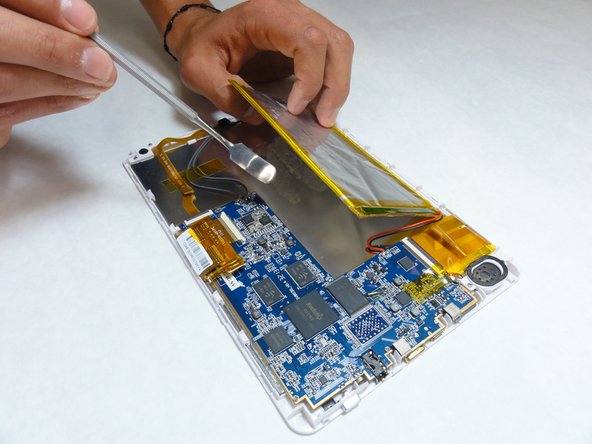
Using a plastic opening tool or spudger, slowly pry the battery away from the board.
-
-
-
Use a two sided adhesive to secure the new battery in place.
-
Solder or crimp the wires back together to reattach to the motherboard.
-
Replace any yellow tape that you removed at the beginning to secure the wires back in place.
-
-

 Ask FixBot



To reassemble your device, follow these instructions in reverse order.

Team

IUPUI, Team 1-3, Baechle Fall 2015 Member of IUPUI, Team 1-3, Baechle Fall 2015
IUPUI-BAECHLE-F15S1G3
5 Members
60 Guides authored
1 Guide Comment
Very good instructions.....but where do I buy the repkacement battery from?
