
Jabra CRUISER2 Status Display Replacement

Spartacus and 3 other contributors
Last updated on Aug 24, 2015
Views: 843
View statistics:
- Past 24 Hours:
- 3
- Past 7 Days:
- 18
- Past 30 Days:
- 81
- All Time:
- 843
Comments: 2
2 comments on steps.
Completed: 1 2
1 person has marked this guide "completed." Will you be next?
2 people have marked this guide "completed." Including you — great job!
Favorites: 0 1
No one has favorited (and subscribed to) this guide. Will you be the first?
1 person has favorited (and subscribed to) this guide — and that's you!
Introduction
Go to step 1 ↓Without a functioning status display, which powers the LED interface, control of the device is limited. This guide will tell you step-by-step how to replace the status display.
What you need
Tools


-
-
-
Use the iOpener tool to unglue the adhesive of the device. The link to the iOpener instructions are listed below.
 Ask FixBot
-
-
-
Place the flat head of the bigger plastic opening tool in between the front plate and back plate.
-
Pull the tool toward the back of the device to pry it open.
-
Repeat this process over all edges of the device.
-
-
-
Open up the device by pulling the front plate straight up from the back plate.
-
-
-
-
-
Carefully detach the wire running from the speaker to the motherboard by unplugging it from the white socket.
-
-
-
Using the PH000, unscrew the three 4.55 mm screws in the motherboard.
-
The names of the screwdriver heads are listed on the sides of each head.
-
-
-
-
-
-
Using the PH000, unscrew the three 4.6mm screws in the status display.
-
-
-
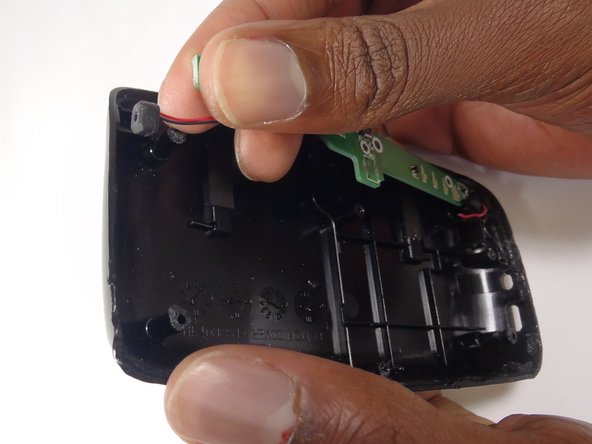
Disconnect the wires connecting the status display to the back plate. Do this by pulling the wire from the black socket.
-
Do this with the wires on both sides of the status board.
-
-




To reassemble your device, follow these instructions in reverse order.
Cancel: I did not complete this guide.
One other person completed this guide.

Team

Baylor, Team 8-13, Williams Fall 2014 Member of Baylor, Team 8-13, Williams Fall 2014
BU-WILLIAMS-F14S8G13
3 Members
60 Guides authored
