Free Shipping on Domestic Orders $75+

JVC MP-XP7210D RAM Replacement

    1. JVC MP-XP7210D RAM Replacement, RAM: step 1, image 1 of 3 JVC MP-XP7210D RAM Replacement, RAM: step 1, image 2 of 3 JVC MP-XP7210D RAM Replacement, RAM: step 1, image 3 of 3
      • Remove the screws of the backplate.

      • See part 2

      • Remove the battery after the screws are removed.

      Ask FixBot

      Add Comment

    2. JVC MP-XP7210D RAM Replacement: step 2, image 1 of 3 JVC MP-XP7210D RAM Replacement: step 2, image 2 of 3 JVC MP-XP7210D RAM Replacement: step 2, image 3 of 3
      • Push and slide to the right.

      • There are 2 locking lugs.

      Ask FixBot

      Add Comment

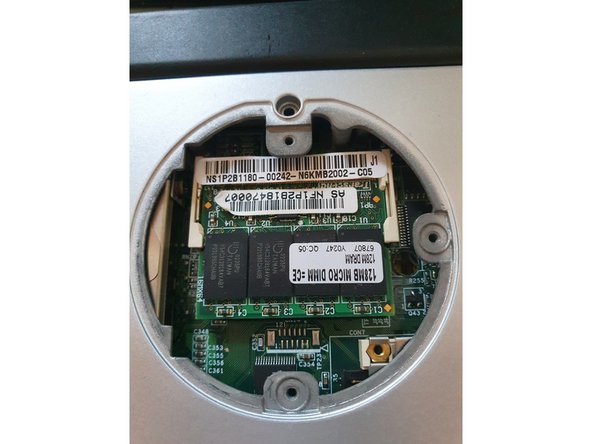
    3. JVC MP-XP7210D RAM Replacement, Remove DIMM: step 3, image 1 of 3 JVC MP-XP7210D RAM Replacement, Remove DIMM: step 3, image 2 of 3 JVC MP-XP7210D RAM Replacement, Remove DIMM: step 3, image 3 of 3
      • Push both locking lugs to the sides.

      • Pull it out.

      • 128 MB (max. 256MB) PC133

      Ask FixBot

      Add Comment

Conclusion

To reassemble your device, follow these instructions in reverse order.

Cancel: I did not complete this guide.

Alex Barblexi

Member since: 03/12/19

347 Reputation

3 Guides authored

0 Guide Comments

Add Comment

View Statistics:

Past 24 Hours: 1

Past 7 Days: 5

Past 30 Days: 24

All Time: 258