Free Shipping on Domestic Orders $75+

JBL Xtreme Charging Port Replacement

What you need

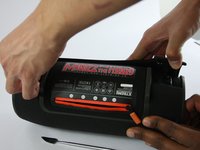
  1. JBL Xtreme Charging Port Replacement, Cover: step 1, image 1 of 2 JBL Xtreme Charging Port Replacement, Cover: step 1, image 2 of 2
    • Locate the seams next to the 'feet' on the bottom side of the device.

    Ask FixBot

    Add Comment

  2. JBL Xtreme Charging Port Replacement: step 2, image 1 of 3 JBL Xtreme Charging Port Replacement: step 2, image 2 of 3 JBL Xtreme Charging Port Replacement: step 2, image 3 of 3
    • Use the metal spudger to gently pry and lift the edge of the seam. The cover is held in place with plastic snaps that will make a popping noise when disengaged. !!Start with the back half, this will expose TWO Screws that need to be removed before lifting the front half.

    Ask FixBot

    Add Comment

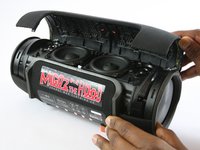
  3. JBL Xtreme Charging Port Replacement: step 3, image 1 of 2 JBL Xtreme Charging Port Replacement: step 3, image 2 of 2
    • For the first part of the case: gently pull back the edges of the case rotating along the hinge opposite the opening seam illustrated in the second photo. Plastic snaps hold the cover in place.

    • For the second part of the case: there are 2 screws to be removed at the seam. Once removed, the case will come off completely without forcing.

    Ask FixBot

    Add Comment

  4. JBL Xtreme Charging Port Replacement, Bass Radiator: step 4, image 1 of 3 JBL Xtreme Charging Port Replacement, Bass Radiator: step 4, image 2 of 3 JBL Xtreme Charging Port Replacement, Bass Radiator: step 4, image 3 of 3
    • Unscrew the six 9.75mm Phillips head screws holding the bass radiator in place.

    • Three of the five outer screws are indicated in the first image and the sixth inner screw is indicated in the second image.

    Ask FixBot

    Add Comment

  5. JBL Xtreme Charging Port Replacement: step 5, image 1 of 3 JBL Xtreme Charging Port Replacement: step 5, image 2 of 3 JBL Xtreme Charging Port Replacement: step 5, image 3 of 3
    • Once the screws have been removed, the bass radiator will easily lift free.

    • Both radiators are identical. Repeat the above steps on the opposite radiator if necessary.

    Ask FixBot

    Add Comment

  6. JBL Xtreme Charging Port Replacement, Charging Port: step 6, image 1 of 3 JBL Xtreme Charging Port Replacement, Charging Port: step 6, image 2 of 3 JBL Xtreme Charging Port Replacement, Charging Port: step 6, image 3 of 3
    • Locate and disconnect the the three plugs indicated in these pictures.

    Ask FixBot

    Add Comment

  7. JBL Xtreme Charging Port Replacement: step 7, image 1 of 2 JBL Xtreme Charging Port Replacement: step 7, image 2 of 2
    Tool used on this step:
    Tweezers
    $4.99
    Buy
    • Unplug the three ports from the previous step.

    • A set of tweezers may be helpful to reach deeper into the device.

    Ask FixBot

    Add Comment

  8. JBL Xtreme Charging Port Replacement: step 8, image 1 of 3 JBL Xtreme Charging Port Replacement: step 8, image 2 of 3 JBL Xtreme Charging Port Replacement: step 8, image 3 of 3
    • Locate the three Phillips head screws inside the zipper compartment and unscrew them.

    • Pull the zipper panel free from the device.

    Ask FixBot

    Add Comment

  9. JBL Xtreme Charging Port Replacement: step 9, image 1 of 3 JBL Xtreme Charging Port Replacement: step 9, image 2 of 3 JBL Xtreme Charging Port Replacement: step 9, image 3 of 3
    • Under the zipper panel are eight more Phillips head screws. Unscrew them and carefully lift the battery cover.

    • Be careful not to damage the small white ribbon cable which connects the battery cover to the rest of the device.

    Ask FixBot

    Add Comment

  10. JBL Xtreme Charging Port Replacement: step 10, image 1 of 2 JBL Xtreme Charging Port Replacement: step 10, image 2 of 2
    • Unscrew the three 11.88mm Phillips head screws highlighted in the picture.

    Ask FixBot

    Add Comment

  11. JBL Xtreme Charging Port Replacement: step 11, image 1 of 2 JBL Xtreme Charging Port Replacement: step 11, image 2 of 2
    • Pull the Auxiliary board out.

    • There is foam covering the wires, making it difficult to remove the Auxiliary board. Take your time with this step.

    Ask FixBot

    Add Comment

  12. JBL Xtreme Charging Port Replacement: step 12, image 1 of 3 JBL Xtreme Charging Port Replacement: step 12, image 2 of 3 JBL Xtreme Charging Port Replacement: step 12, image 3 of 3
    • The first image highlights the charging port.

    • Locate 6 metal pins highlighted in the second image and use a solder iron to disconnect the pins.

    Ask FixBot

    Add Comment

Conclusion

To reassemble your device, follow these instructions in reverse order.

Cancel: I did not complete this guide.

18 other people completed this guide.

Benny Huynh

Member since: 02/15/17

2,118 Reputation

4 Guides authored

Team

USF Tampa, Team 1-1, Sullivan Spring 2017 Member of USF Tampa, Team 1-1, Sullivan Spring 2017

USFT-SULLIVAN-S17S1G1

4 Members

28 Guides authored

2 Guide Comments

Please I have a JBL XTREME that sparks each time I plug it. What could be the cause

morris_ugwoke - Reply Share

Hi. Can someone advise where a replacement charging port can be sourced? I.e., so I can desolder the existing one and solder a new one in its place. The existing one is badly corroded so the unit won't charge. Thanks Andy

Andy R - Reply Share

Add Comment

View Statistics:

Past 24 Hours: 10

Past 7 Days: 53

Past 30 Days: 256

All Time: 27,918