Free Shipping on Domestic Orders $75+

JBL Live 660NC Motherboard Replacement

What you need

  1. JBL Live 660NC Motherboard Replacement, Battery: step 1, image 1 of 3 JBL Live 660NC Motherboard Replacement, Battery: step 1, image 2 of 3 JBL Live 660NC Motherboard Replacement, Battery: step 1, image 3 of 3
    • The battery is located in the left earcup. All steps in this guide must be performed on the left earcup.

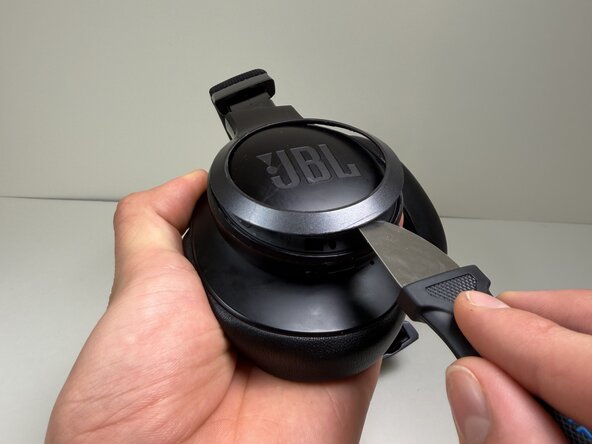
    • Use a Jimmy or spudger to pry the bezel around the JBL plate.

    • Gently slide the tool around the edges to loosen the clips.

    • Lift the bezel off.

  2. JBL Live 660NC Motherboard Replacement: step 2, image 1 of 1
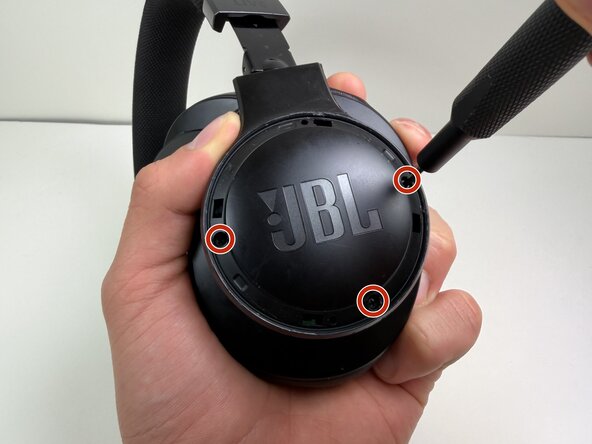
    • Remove the three 5 mm screws with a Phillips #00 screwdriver.

  3. JBL Live 660NC Motherboard Replacement: step 3, image 1 of 1
    • Use a Tri-point Y0 screwdriver to remove the two 5 mm screws at the base of the headband where it connects to the earcup.

  4. JBL Live 660NC Motherboard Replacement: step 4, image 1 of 3 JBL Live 660NC Motherboard Replacement: step 4, image 2 of 3 JBL Live 660NC Motherboard Replacement: step 4, image 3 of 3
    • Use a nylon spudger or Jimmy to pry the earcup cover.

    • Gently slide the tool around the edges to loosen the clips holding the cover in place.

    • Lift the cover off.

    • Don't pull the cover off. The cover is still connected to the headphones by the battery cable.

    • Avoid using metal tools near the battery and other internal components Puncturing or shorting the battery can cause a fire or injury. Use a plastic or nylon opening tool instead.

  5. JBL Live 660NC Motherboard Replacement: step 5, image 1 of 2 JBL Live 660NC Motherboard Replacement: step 5, image 2 of 2
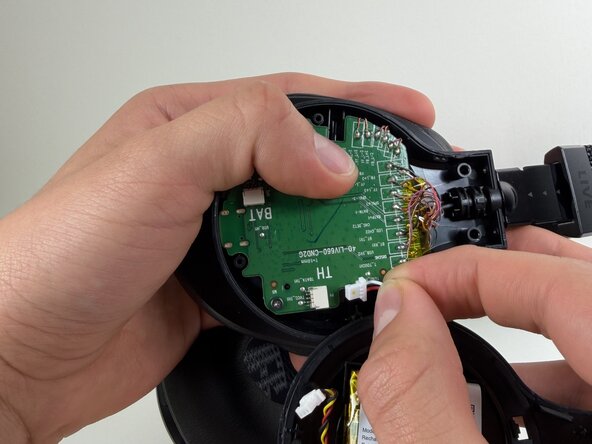
    • Use a spudger to push the connector labeled BAT from the socket on the motherboard to disconnect the battery cable

    • Don’t pull on the wires—this can damage the connector and the device.

  6. JBL Live 660NC Motherboard Replacement: step 6, image 1 of 2 JBL Live 660NC Motherboard Replacement: step 6, image 2 of 2
    • Use the tip of the spudger to push the plastic locking tab away from the socket labeled TH—it should only move about 1–2 mm.

    • Carefully remove the cable connector from the socket on the board.

    • Avoid pulling on the wires, and don’t twist or bend them.

  7. JBL Live 660NC Motherboard Replacement: step 7, image 1 of 2 JBL Live 660NC Motherboard Replacement: step 7, image 2 of 2
    • Remove the battery from the inside cover.

    • If the battery looks swollen, don't attempt to remove it. Check out the What to Do With a Swollen Battery guide for additional information and instructions.

  8. JBL Live 660NC Motherboard Replacement, Motherboard: step 8, image 1 of 1
    • Remove the two 5 mm screws with a Phillips #00 screwdriver.

  9. JBL Live 660NC Motherboard Replacement: step 9, image 1 of 1
    • Take a clear photo of the wire connections before desoldering. This will help you remember where each wire belongs when you install the new motherboard.

    • Gold and blue wire

    • Golden Wire

    • Mandarin Wire

    • Red Wire

    • Blue Wire

    • Black Wire

    • Pink Wire

  10. JBL Live 660NC Motherboard Replacement: step 10, image 1 of 1
    • Take a clear photo of the wire connections before desoldering. This will help you remember where each wire belongs when you install the new motherboard.

    • Cooper wire

    • Red wire

    • Gold wire

    • White wire

    • Black wire

  11. JBL Live 660NC Motherboard Replacement: step 11, image 1 of 2 JBL Live 660NC Motherboard Replacement: step 11, image 2 of 2
    • Use a soldering iron to carefully desolder and remove each wire from the motherboard.

    • If you’re not familiar with desoldering, refer to the How to Solder and Desolder Connections guide for instructions.

    • The soldering iron gets very hot. Handle it carefully to avoid burns or damage to the components.

  12. JBL Live 660NC Motherboard Replacement: step 12, image 1 of 1
    • Remove the motherboard from the headphones.

Conclusion

To reassemble your device, follow these instructions in reverse order. Take your e-waste to an R2 or e-Stewards certified recycler.

Alexander Diaz

Member since: 10/01/25

221 Reputation

1 Guide authored

0 Guide Comments

Add Comment

View Statistics:

Past 24 Hours: 4

Past 7 Days: 18

Past 30 Days: 62

All Time: 362