
JBL Grip LED Board Replacement

Isaac Loma and 3 other contributors
Last updated on May 18, 2026
Views: 244
View statistics:
- Past 24 Hours:
- 1
- Past 7 Days:
- 8
- Past 30 Days:
- 59
- All Time:
- 244
Comments: 0
No one has left comments on this guide. Will you be first?
Go to guide commentsCompleted: 0 1
No one has marked this guide "completed." Will you be the first?
1 person has marked this guide "completed." It's you — great job!
Favorites: 0 1
No one has favorited (and subscribed to) this guide. Will you be the first?
1 person has favorited (and subscribed to) this guide — and that's you!
Introduction
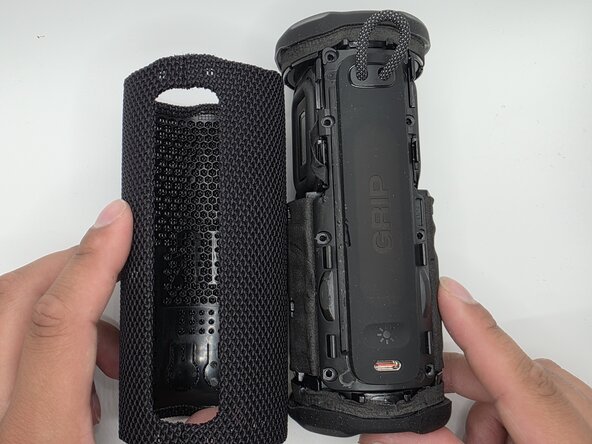
Go to step 1 ↓This guide will walk you through safely removing and replacing the LED board in your JBL Grip speaker. Replacing the LED board may be necessary if the speaker’s lights no longer turn on, appear dim, flicker during use, stay stuck on a single color, or fail to respond properly while charging or in use.
The LED board is located inside the speaker and is connected to other internal components through small wires and connectors. Accessing it requires removing the outer casing and charging port panel, which means you will need to handle small screws, delicate clips, and internal cables carefully throughout the repair.
Before starting, power the speaker off completely and disconnect it from any charging cable or power source.
What you need
Tools


-
-
-
-
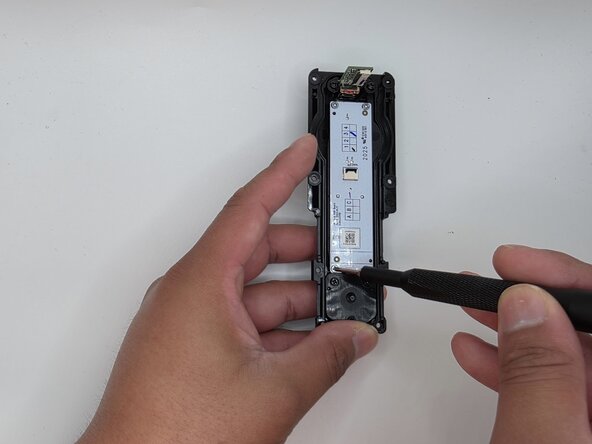
Remove the eight 6mm screws securing the panel with a Phillips #2 screwdriver.
-
-
-
Flip up the black latches securing the two blue cables connected to the panel.
-
-
-
-
-
-
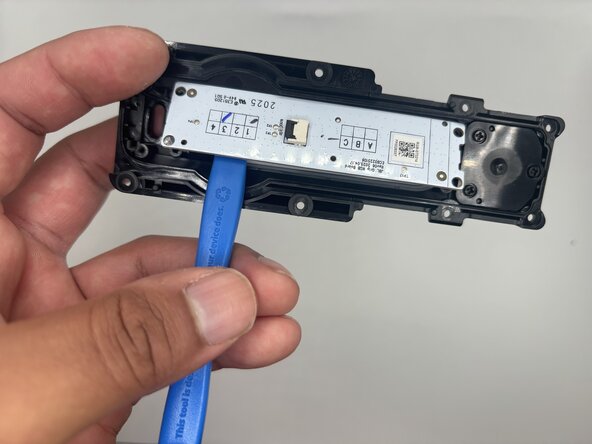
Remove the four 3mm screws securing the board to panel with a Phillips #2 screwdriver.
-
-


 Ask FixBot







To reassemble your device, follow these instructions in reverse order.

Team

University of North Texas, Team 1-4, Kilpatrick Spring 2026 Member of University of North Texas, Team 1-4, Kilpatrick Spring 2026
UNT-KILPATRICK-S26S1G4
5 Members
96 Guides authored
