Introduction
This is a guide on how to replace the speaker driver for the JBL Clip 4.
The speaker driver is the piece that plays the music in the device.
It can be the cause for issues in audio quality, so it replacing the part can help with that.
What you need
-
-
-
Remove the front grill with a pry tool. The front grill is glued onto the device.
 Ask FixBot
-
-
-
Now you just need to pry it off using your chosen tool and it should come off easily leaving you with the front grill separated from the device. Your device should look like this after removing the front grill.
-
-
-
-
-
First, you must unscrew the 5 Phillip head screws (6mm) around the edge of the device.
-
-
-
-
Now with the unscrewed front and back housing, you should see some cables that connect between the two. Simply unplug these cables and the back housing will come apart from the front.
-
-
-
-
-
The battery connects into the motherboard, and it is inside the black box shaped part that has a cable connecting into the motherboard. You must disconnect the cable connecting the battery to the motherboard.
-
-
-
Now all you need to do is pull the battery out of the case its in and you have successfully disconnected the battery from the device.
-
-
-
-
-
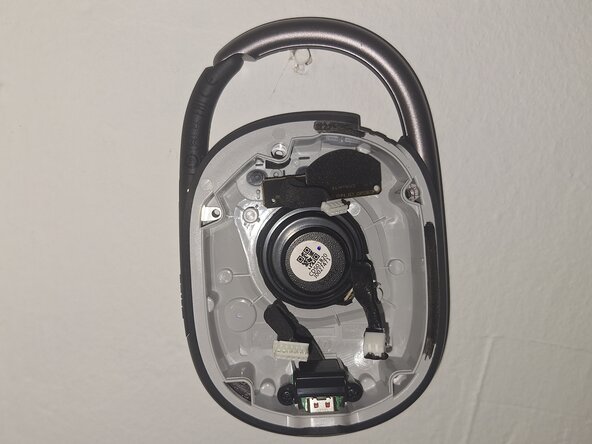
The component in the middle is the speaker driver, its cable will be disconnected already since it was required to disconnect the back housing, so you just need to flip this part over.
-
-
-
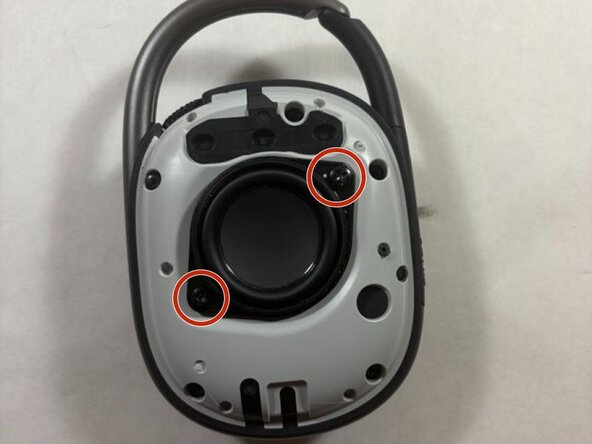
Now, with the device flipped, you need to unscrew these two 5mm screws that connect the front housing and the speaker driver together.
-
-



To reassemble your device, follow these instructions in reverse order. Take your e-waste to an R2 or e-Stewards certified recycler.
Cancel: I did not complete this guide.
One other person completed this guide.

Team

UMass Dartmouth, Team 3-4, Shaddix Spring 2026 Member of UMass Dartmouth, Team 3-4, Shaddix Spring 2026
UMASSD-SHADDIX-S26S3G4
4 Members
84 Guides authored
