Free Shipping on Domestic Orders $75+

JBL Charge 4 Speaker Replacement

What you need

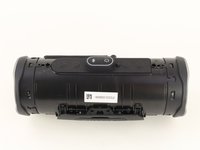
    1. JBL Charge 4 Speaker Replacement, Speaker Grill: step 1, image 1 of 1
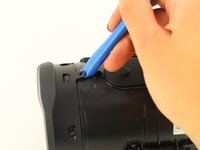
      • Flip your speaker over and insert the plastic opening tool into the slit on the grille.

      • Pry away from yourself towards the back of the speaker to release the clip.

      • Repeat this process for the clip on the other side.

      Ask FixBot

      Add Comment

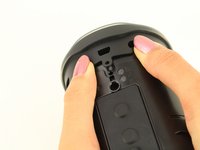
    2. JBL Charge 4 Speaker Replacement: step 2, image 1 of 2 JBL Charge 4 Speaker Replacement: step 2, image 2 of 2
      • Remove the two 8mm Phillips #0 screws from the other edge of the grille.

      Ask FixBot

      Add Comment

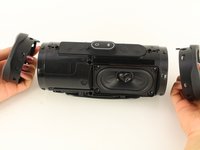
    3. JBL Charge 4 Speaker Replacement: step 3, image 1 of 1
      • Pull apart both sides of the grille.

      • Lift the cover off of the speaker.

      Ask FixBot

      Add Comment

    1. JBL Charge 4 Speaker Replacement, Passive Bass Radiators: step 4, image 1 of 2 JBL Charge 4 Speaker Replacement, Passive Bass Radiators: step 4, image 2 of 2
      • Using the plastic opening tool, lift the tab on top of the speaker to release the radiator from the clips.

      • Repeat this process on the other clips around the radiator to release it from the frame.

      Ask FixBot

      Add Comment

    2. JBL Charge 4 Speaker Replacement: step 5, image 1 of 2 JBL Charge 4 Speaker Replacement: step 5, image 2 of 2
      • Push the radiator off of the frame of the device.

      • Repeat on the other side.

      • The passive bass radiators seal out water from inside the device. Removing them multiple times may compromise the waterproof nature of the speaker.

      Ask FixBot

      Add Comment

    1. JBL Charge 4 Speaker Replacement, Speaker: step 6, image 1 of 2 JBL Charge 4 Speaker Replacement, Speaker: step 6, image 2 of 2
      • Flip the device so that the speaker faces you.

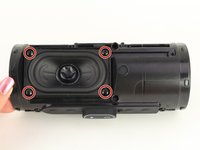
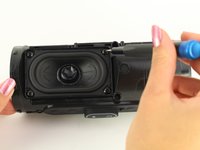
      • Remove the four 8mm Phillips #1 screws.

      Ask FixBot

      Add Comment

    2. JBL Charge 4 Speaker Replacement: step 7, image 1 of 1
      • Gently pull out the speaker.

      Ask FixBot

      Add Comment

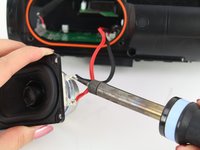
    3. JBL Charge 4 Speaker Replacement: step 8, image 1 of 2 JBL Charge 4 Speaker Replacement: step 8, image 2 of 2
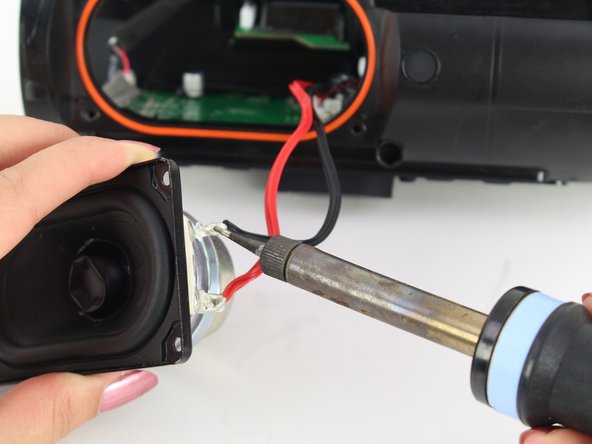
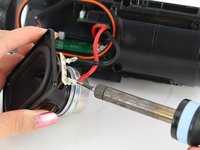
      • Desolder the red and black wires.

      • A guide for soldering and desoldering can be found here.

      Ask FixBot

      Add Comment

Conclusion

To reassemble your device, follow these instructions in reverse order.

Cancel: I did not complete this guide.

13 other people completed this guide.

Rohith Dara

Member since: 01/24/19

429 Reputation

1 Guide authored

Team

Cal Poly, Team S1-G1, White Winter 2019 Member of Cal Poly, Team S1-G1, White Winter 2019

CPSU-WHITE-W19S1G1

4 Members

84 Guides authored

12 Guide Comments

Perfect - But where to get the replacement speaker ??? I’ve searched whole web. Please give me the info about replacement speaker diaphragm. Regards, T

Tadej Tomašič - Reply Share

Jbl charge 4

carlos maltez - Reply Share

Jbl charge 4 Led indicator board G ribbon cable authentic

carlos maltez - Reply Share

Add Comment

View Statistics:

Past 24 Hours: 8

Past 7 Days: 56

Past 30 Days: 200

All Time: 28,231