
JBL Charge 2 Partial Teardown

Alexandre Isaac and 2 other contributors
Last updated on Aug 20, 2024
Views: 56K
View statistics:
- Past 24 Hours:
- 6
- Past 7 Days:
- 75
- Past 30 Days:
- 287
- All Time:
- 56,229
Comments: 14
1 comment on steps, 13 guide comments.
Go to guide commentsCompleted: 10 11
10 people have marked this guide "completed." Will you be next?
11 people have marked this guide "completed." Including you — great job!
Favorites: 4 5
4 people have favorited (and subscribed to) this guide. Will you be next?
5 people have favorited (and subscribed to) this guide — including you!
Featured Guide
This guide has been found to be exceptionally cool by the iFixit staff.
Community-Contributed Guide
An awesome member of our community made this guide. It was not created by iFixit staff.
Introduction
Go to step 1 ↓This guide is not a total teardown. Rather, it covers only the largest components of the device. See the video below for a visual representation.
Note: On this specific speaker, a new charge port was installed.
What you need
Tools
-
Spudger4.9


Video Overview
-
-
-
Use a plastic spudger/spatula, credit card or something similar to remove the protective mesh.
 Ask FixBot
-
-
-
Remove the four screws holding the plastic moulding on the end of the speaker.
-
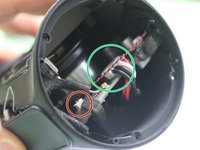
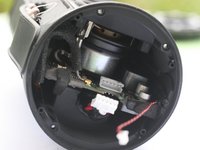
Next, remove the plastic to reveal four more screws requiring removal.
-
-
-
-
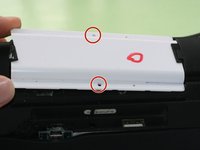
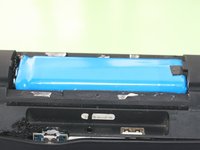
Remove the two screws securing the white battery cover. Once removed, you will have direct access to the battery.
-
-




To reassemble your device, follow these instructions in reverse order.
Cancel: I did not complete this guide.
10 other people completed this guide.
Special thanks to these translators:
100%


These translators are helping us fix the world! Want to contribute?
Start translating ›

13 Guide Comments
About to try this, will give feedback
This is the charge2 + not the charge2
there aren,t any screws in the cap
Thanks so much! I had a broken bit of plastic inside the tube after I left my speaker in my checked luggage and it got smashed around. I followed the instructions and managed to get it out, the speaker is purring again without the annoying ass rattle!! You're a legend my friend. TY
