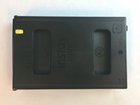
Instax Mini 90 Film Cartridge Replacement

Elliott Tegan-Tawney and 3 other contributors
Last updated on Jun 2, 2017
Views: 25K
View statistics:
- Past 24 Hours:
- 8
- Past 7 Days:
- 44
- Past 30 Days:
- 189
- All Time:
- 24,755
Comments: 9
4 comments on steps, 5 guide comments.
Go to guide commentsCompleted: 1 2
1 person has marked this guide "completed." Will you be next?
2 people have marked this guide "completed." Including you — great job!
Favorites: 0 1
No one has favorited (and subscribed to) this guide. Will you be the first?
1 person has favorited (and subscribed to) this guide — and that's you!
Introduction
Go to step 1 ↓A new Instax Mini 90 Film Cartridge is required for this process. The right size for this camera is 86mm x 54mm. This replacement is simple, but if you do not have the proper film cartridge, you will get an error notification from the camera. To get the most out of your film, keep it in a cool, dry place, and refrain from removing the cartridge while there are still exposures left on it.
What you need
Parts
-
-
-
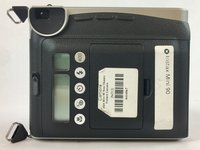
Turn ON the camera, and flip it over so that the back cover is visible.
 Ask FixBot
-
-
-
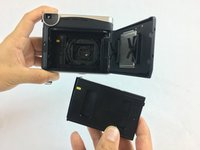
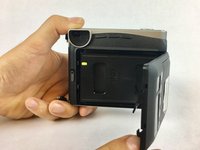
Unlock the back cover. It should automatically spring open. If there is an old film cartridge loaded in the camera, remove it.
-
-
-
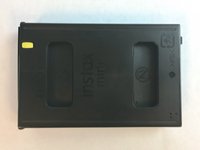
Unwrap the new film cartridge, taking care to not touch the film inside. Only handle the film cartridge by its plastic shell.
-
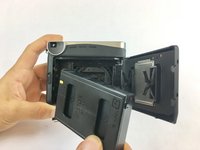
Line up the small, yellow line on the cartridge with the corresponding yellow line inside the camera. The yellow line on the cartridge should be facing up, away from the camera.
-
-
-




To reassemble your device, follow these instructions in reverse order.
Cancel: I did not complete this guide.
One other person completed this guide.

Team

USF Tampa, Team S2-G1, Nance Spring 2017 Member of USF Tampa, Team S2-G1, Nance Spring 2017
USFT-NANCE-S17S2G1
4 Members
72 Guides authored
5 Guide Comments
Having an issue with the film pack not loading. Have tried resetting, removing battery etc. Any ideas?
Me too! Ive removed battery, replaced with fresh battery, nothing happens! Ive just used it once! Help!!
I am not too sure how to fix that, but definitely try contacting Fujifilm, as they know much more about their products and do repairs as well! https://www.fujifilmusa.com/support/Serv...
I have a fujifilm instax mini evo hybrid black instant camera but it does not detect film. The message of putting a new cartridge keeps popping-up. Do you know what could be the cause?
