Free Shipping on Domestic Orders $75+

Instant Pot IP-DUO80 V2 LED Display Replacement

What you need

    1. Instant Pot IP-DUO80 V2 LED Display Replacement, LED Display: step 1, image 1 of 3 Instant Pot IP-DUO80 V2 LED Display Replacement, LED Display: step 1, image 2 of 3 Instant Pot IP-DUO80 V2 LED Display Replacement, LED Display: step 1, image 3 of 3
      • Open the lid by turning it counter-clockwise and lifting up.

      • Remove the inner pot.

      Ask FixBot

      Add Comment

    2. Instant Pot IP-DUO80 V2 LED Display Replacement: step 2, image 1 of 3 Instant Pot IP-DUO80 V2 LED Display Replacement: step 2, image 2 of 3 Instant Pot IP-DUO80 V2 LED Display Replacement: step 2, image 3 of 3
      • Turn the Instant Pot upside down.

      • Remove the single 12-mm screw by using the T-15 head screwdriver and turning it counter-clockwise.

      • Turn the plate counter-clockwise and lift it off the Instant Pot.

      Ask FixBot

      Add Comment

    3. Instant Pot IP-DUO80 V2 LED Display Replacement: step 3, image 1 of 2 Instant Pot IP-DUO80 V2 LED Display Replacement: step 3, image 2 of 2
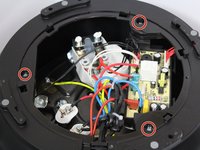
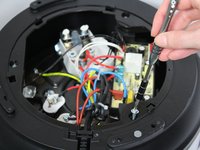
      • Remove the three 19-mm screws in the black plastic base's edge using the PH-1 head screwdriver and twisting counter-clockwise.

      Ask FixBot

      Add Comment

    4. Instant Pot IP-DUO80 V2 LED Display Replacement: step 4, image 1 of 2 Instant Pot IP-DUO80 V2 LED Display Replacement: step 4, image 2 of 2
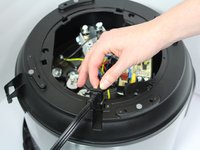
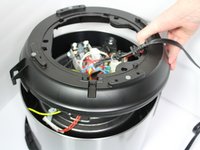
      • Pull the power cord out of its slot.

      • Pull up on the edge of the black plastic base to remove the base.

      Ask FixBot

      Add Comment

    5. Instant Pot IP-DUO80 V2 LED Display Replacement: step 5, image 1 of 3 Instant Pot IP-DUO80 V2 LED Display Replacement: step 5, image 2 of 3 Instant Pot IP-DUO80 V2 LED Display Replacement: step 5, image 3 of 3
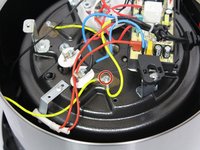
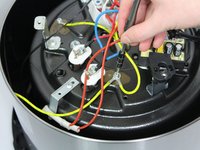
      • Disconnect the two green-striped yellow wires that are connected onto the bottom of the heating element. Use a PH-1 head screwdriver and turn counter-clockwise to remove the 10-mm screw holding them in place.

      • Be careful not to lose the small washer that comes with this screw.

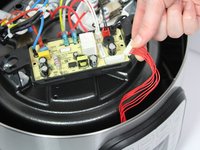
      • Pull up on the cn101 connection to detach the LED display from the motherboard.

      Ask FixBot

      Add Comment

    6. Instant Pot IP-DUO80 V2 LED Display Replacement: step 6, image 1 of 1
      • Lift the silver outer shell off of the top black ring.

      Ask FixBot

      Add Comment

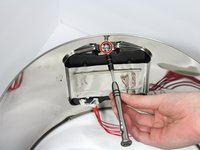
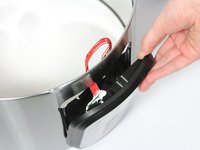
    7. Instant Pot IP-DUO80 V2 LED Display Replacement: step 7, image 1 of 3 Instant Pot IP-DUO80 V2 LED Display Replacement: step 7, image 2 of 3 Instant Pot IP-DUO80 V2 LED Display Replacement: step 7, image 3 of 3
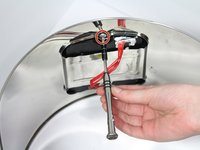
      • Remove the two 10-mm screws connecting the LED display to the outer shell using a PH-1 head screwdriver and twisting counter clockwise.

      • Pull out the LED display by pulling on it gently.

      Ask FixBot

      Add Comment

Conclusion

To reassemble your device, follow these instructions in reverse order.

Cancel: I did not complete this guide.

7 other people completed this guide.

Kayla Meacham

Member since: 01/23/18

646 Reputation

5 Guides authored

Team

Cal Poly, Team S18-G2, Livingston Winter 2018 Member of Cal Poly, Team S18-G2, Livingston Winter 2018

CPSU-LIVINGSTON-W18S18G2

4 Members

60 Guides authored

2 Guide Comments

Where can I get the replacement for the display?

Starfish Doodle - Reply Share

Hola disculpa, donde puedo conseguir la pantalla led de mi instat pot DUO PLUS MULTI-COOKER 9in 1

Evaristo - Reply Share

Add Comment

View Statistics:

Past 24 Hours: 6

Past 7 Days: 14

Past 30 Days: 83

All Time: 8,587