
Insignia NS-CSPBTHOL-R Speakers Replacement

Lheessis Ruiz and 3 other contributors
Last updated on May 7, 2024
Views: 1.2K
View statistics:
- Past 24 Hours:
- 1
- Past 7 Days:
- 15
- Past 30 Days:
- 76
- All Time:
- 1,155
Comments: 1
1 guide comment.
Go to guide commentsCompleted: 0 1
No one has marked this guide "completed." Will you be the first?
1 person has marked this guide "completed." It's you — great job!
Favorites: 0 1
No one has favorited (and subscribed to) this guide. Will you be the first?
1 person has favorited (and subscribed to) this guide — and that's you!
Introduction
Go to step 1 ↓If your speakers no longer sound strong/clear or they stopped producing sound, you may need to replace them. Use this guide to help you replace he speakers.
What you need
Tools


-
-
-
Insert the Spudger between the grated panel and the base of the speaker.
 Ask FixBot
-
-
-
Remove the six 3mm screws using the J00 JIS screw bit. This will require a long, narrow screwdriver.
-
-
-
Insert the Spudger between the corners of base and the face of the speaker to open the device.
-
The screw on the upper right corner may be difficult to take out. If you cannot take it out with a screwdriver, using force to pull the face of the speaker apart may break the plastic that surrounds the screw.
-
-
-
Tool used on this step:Tweezers$4.99
-
Using blunted tip tweezers, squeeze and pull on the white plastic clip. This will separate the speaker's wires from the motherboard.
-
-


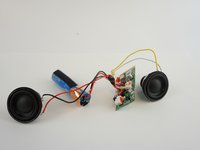
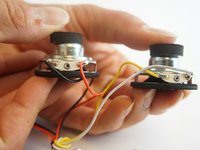
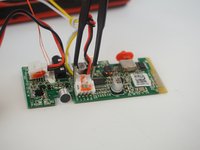
To reassemble your device, follow these instructions in reverse order.

Team

USF Tampa, Team 12-6, Eyestone Spring 2017 Member of USF Tampa, Team 12-6, Eyestone Spring 2017
USFT-EYESTONE-S17S12G6
3 Members
48 Guides authored
1 Guide Comment
This is a good app really could help some people like myself. Thank you
