
InFocus IN3104 Filter Replacement

Tae Min Kim and 3 other contributors
Last updated on May 28, 2020
Views: 725
View statistics:
- Past 24 Hours:
- 2
- Past 7 Days:
- 15
- Past 30 Days:
- 75
- All Time:
- 725
Comments: 1
1 comment on steps.
Completed: 0 1
No one has marked this guide "completed." Will you be the first?
1 person has marked this guide "completed." It's you — great job!
Favorites: 0 1
No one has favorited (and subscribed to) this guide. Will you be the first?
1 person has favorited (and subscribed to) this guide — and that's you!
Introduction
Go to step 1 ↓If your Infocus IN3104 has high temperature, you most likely have a clogged or defective filter. The filter is designed to prevent any dust or debris from entering the device. When it is clogged or damaged, it may result in high device temperature. Dust can also create static electricity if the power cord is connected. Remove any power sources before you start.
What you need
Tools


-
-
-
Turn the projector so that the lens is facing you.
-
Use a Phillips #1 screwdriver to remove the 6 mm screw that secures top cover.
-
Remove the service cover.
 Ask FixBot
-
-
-
Use a Phillips #1 screwdriver to remove the seven 6 mm screws.
-
Use a Phillips #1 screwdriver to remove the two 5 mm screws.
-
Remove 2 screws on the back panel (not pictured)
-
Remove the top cover.
-
-
-
-
-
-
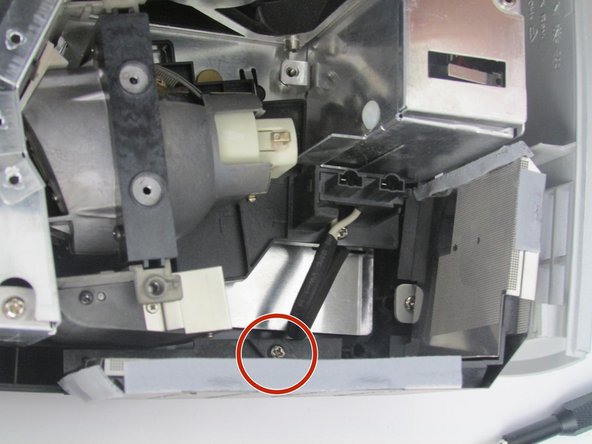
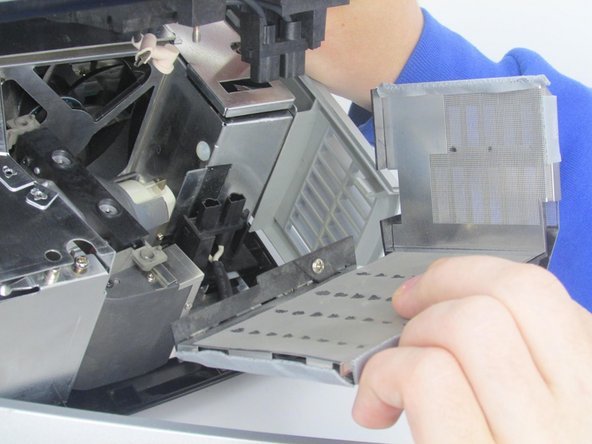
Use a Phillips # 1 screw driver to remove the 6 mm screw that secures the filter.
-
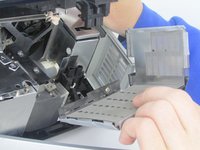
Once the screw is removed, remove the filter by pulling it straight out.
-
-


To reassemble your device, follow these instructions in reverse order.

Team

Embry-Riddle Aeronautical University, Team S5-G5, Watkins Spring 2020 Member of Embry-Riddle Aeronautical University, Team S5-G5, Watkins Spring 2020
ERAU-WATKINS-S20S5G5
4 Members
84 Guides authored
