
IBM Thinkpad T60 RAM Replacement

Cody Kratochvil and 10 other contributors
Last updated on Jun 22, 2018
Views: 17K
View statistics:
- Past 24 Hours:
- 3
- Past 7 Days:
- 26
- Past 30 Days:
- 136
- All Time:
- 16,564
Comments: 5
5 comments on steps.
Completed: 17 18
17 people have marked this guide "completed." Will you be next?
18 people have marked this guide "completed." Including you — great job!
Favorites: 2 3
2 people have favorited (and subscribed to) this guide. Will you be next?
3 people have favorited (and subscribed to) this guide — including you!
Needs More Images
A few more images would make this guide's procedures crystal clear.
Introduction
Go to step 1 ↓This guide will show how to remove and replace the RAM of the IBM Thinkpad T60. Remember to always power down the computer before attempting any installation/removal of any hardware components. Be sure to remove the AC adapter and all cables from the computer. If the computer has been on, wait several minutes before beginning the procedure to ensure all parts have cooled down.
What you need
Parts


Tools

-
-
-
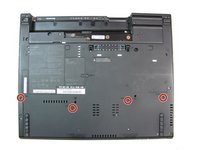
Turn the computer over to see the small tab on the battery located near the top of the Thinkpad.
-
Use your finger to slide the tab to the right to unlock the battery.
 Ask FixBot
-
-
-
Once the tab is in the unlocked position (far right), pull the battery outwards away from the Thinkpad.
-
The battery is now disconnected.
-
-
-
-
-
Turn the computer back over, so the keyboard is facing upwards.
-
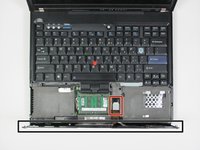
Open the display to access the palm rest. Apply pressure to the sides of the palm rest so that it bends upwards in the middle. Gently lift away from the computer.
-
-
-
Slightly lift the palm rest away from the computer.
-
Detach the connector by pulling upwards on the white tab.
-
-
-
-
-
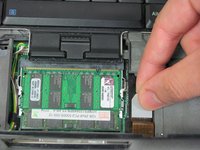
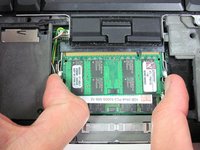
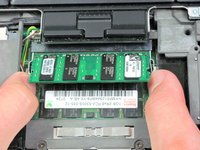
Press out the two tabs on either side of the card at the same time.
-
The memory card will slide upwards at a 20 degree angle.
-
-







To reassemble your device, follow these instructions in reverse order.
Cancel: I did not complete this guide.
17 other people completed this guide.

Team

Cal Poly, Team 7-9, Maness Winter 2013 Member of Cal Poly, Team 7-9, Maness Winter 2013
CPSU-MANESS-W13S7G9
4 Members
96 Guides authored
