Free Shipping on Domestic Orders $75+

HyperX CloudX Flight Battery Replacement

What you need

    1. HyperX CloudX Flight Battery Replacement, Battery: step 1, image 1 of 3 HyperX CloudX Flight Battery Replacement, Battery: step 1, image 2 of 3 HyperX CloudX Flight Battery Replacement, Battery: step 1, image 3 of 3
      • Gently pull around the perimeter of the right ear cup until the cushion is fully removed.

      Ask FixBot

      Add Comment

    2. HyperX CloudX Flight Battery Replacement: step 2, image 1 of 1
      • Unscrew the top of the speaker using a Phillips #00 screwdriver.

      Ask FixBot

      Add Comment

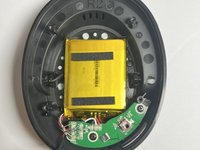
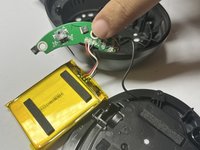
    3. HyperX CloudX Flight Battery Replacement: step 3, image 1 of 2 HyperX CloudX Flight Battery Replacement: step 3, image 2 of 2
      • Pull the battery out.

      • Desolder the battery wires from the circuit board.

      • Remember the order the wires are in; you will need to keep them in this order for the replacement.

      Ask FixBot

      Add Comment

Conclusion

To reassemble your device, follow these instructions in reverse order.

Cancel: I did not complete this guide.

One other person completed this guide.

0 Guide Comments

Add Comment

View Statistics:

Past 24 Hours: 4

Past 7 Days: 24

Past 30 Days: 112

All Time: 1,351