Introduction
There are wired and wireless Rain Cliks. These rain sensors contain discs made of organic material inside. When the discs get wet, they swell and trigger a switching action. Over time, the material decomposes and the interior becomes dirty. The sensor then no longer functions properly. Hunter offers an affordable replacement (Hunter 505900), and the replacement process is very simple.
-
-
-
Figure 2 shows the wireless version installed in the garden.
-
It's much easier to work if you remove the entire sensor.
 Ask FixBot
-
-
-
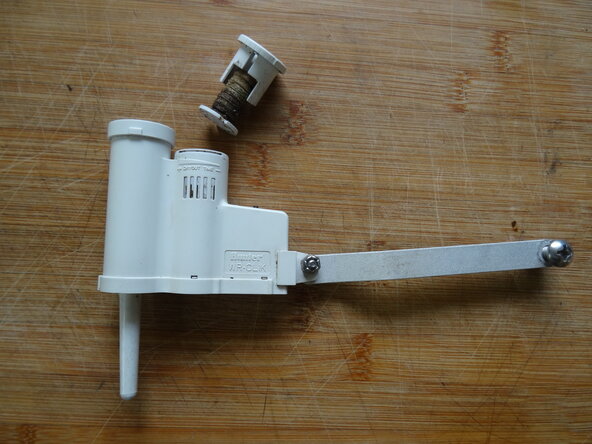
Use your fingernail to lift the disc assembly.
-
Take out the assembly.
-
Figure 2 shows the old insert and the replacement part.
-
-
-
-
Using a toothpick and a cotton swab thoroughly clean the insides. There was a lot of dirt in there — no wonder the sensor stopped working.
-
Keep an eye on the spring. Don't lose it. Put it back exactly in the middle.
-
-
-
Push the insert back in. The lid must audibly click into place on both sides and be able to move freely.
-
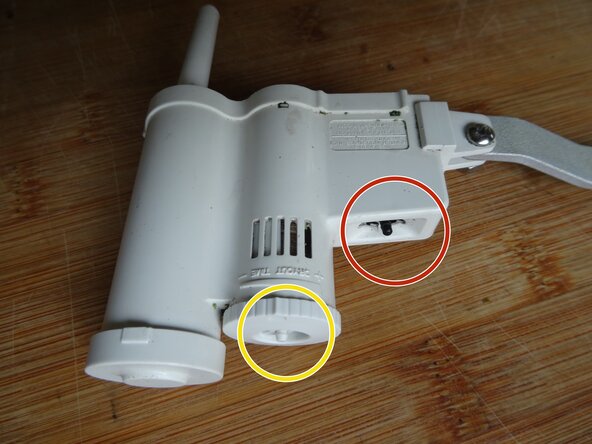
Turning the lid opens the ventilation slots. Depending on the number of slots that are open, the drying time will be longer or shorter.
-
To test the sensor, press and hold the black button for about 10 seconds. A LED on the bottom of the wireless model should flash, and the control unit should then turn off.
-
You can also pour water into the opening from above, over the discs. Wait a few minutes until the discs have swollen, then the control unit should turn off.
-
-




Follow the steps in reverse order to reassemble your device.
Special thanks to these translators:
100%

VauWeh is helping us fix the world! Want to contribute?
Start translating ›

