Introduction
Use this guide to replace the motherboard in your Huawei P10 Lite smartphone.
What you need
-
-
-
Insert the tip of an opening pick between the back cover and the mid frame and slide it around the phone, to cut the adhesive.
-
Using a suction handle to lift the back cover may help to get an initial gap for the opening pick to put in.
 Ask FixBot
-
-
-
After you cut the adhesive on every edge, twist your opening pick, to separate the rear cover from the phone.
-
Flip the rear cover over to the right side of the phone.
-
-
Tool used on this step:Tweezers$4.99
-
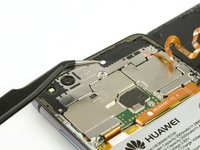
Use a pair of tweezers to remove the sticker.
-
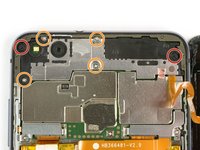
Remove the two Phillips #00 screws.
-
Remove the four 2.5 mm Phillips #00 screws.
-
-
-
-
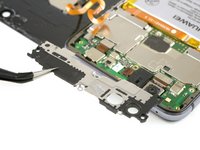
Use tweezers to remove the mainboard shield.
-
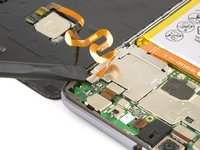
Use the flat end of a spudger to disconnect the finger print sensor flex cable.
-
-
-
-
-
Use a SIM card removal bit or tool and push it into the small hole in the SIM card tray.
-
Remove the SIM card tray.
-
-
-
-
Tool used on this step:Tweezers$4.99
-
Remove the three Phillips #000 screws.
-
Use tweezers to remove the two metal shields which cover the flex cables on the mainboard.
-
-
-
Use the flat end of a spudger to disconnect the volume and power button, the display and the main flex cable.
-
-
-
Disconnect the battery flex cable with a spudger.
-
Unplug the antenna cable with tweezers.
-
-
-
Disconnect the headphone jack flex cable with the flat end of a spudger.
-
Use an opening pick to pry out the motherboard until you can get a good grip.
-
Remove the motherboard.
-
-






To reassemble your device, follow these instructions in reverse order. When reassembling your phone apply new adhesive where it is necessary.
Cancel: I did not complete this guide.
8 other people completed this guide.


