Free Shipping on Domestic Orders $75+

Huawei P10 Lite Back cover Replacement

What you need

    1. Huawei P10 Lite Back cover Replacement, Back cover: step 1, image 1 of 3 Huawei P10 Lite Back cover Replacement, Back cover: step 1, image 2 of 3 Huawei P10 Lite Back cover Replacement, Back cover: step 1, image 3 of 3
      • Insert the tip of an opening pick between the back cover and the mid frame and slide it around the phone, to cut the adhesive.

      • Using a suction handle to lift the back cover may help to get an initial gap for the opening pick to put in.

      • If the adhesive is hard to cut, use an iOpener to loosen it.

      Ask FixBot

      Add Comment

    2. Huawei P10 Lite Back cover Replacement: step 2, image 1 of 3 Huawei P10 Lite Back cover Replacement: step 2, image 2 of 3 Huawei P10 Lite Back cover Replacement: step 2, image 3 of 3
      • After you cut the adhesive on every edge, twist your opening pick, to separate the rear cover from the phone.

      • Flip the rear cover over to the right side of the phone.

      Ask FixBot

      Add Comment

    3. Huawei P10 Lite Back cover Replacement: step 3, image 1 of 2 Huawei P10 Lite Back cover Replacement: step 3, image 2 of 2
      Tool used on this step:
      Tweezers
      $4.99
      Buy
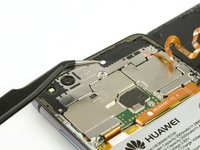
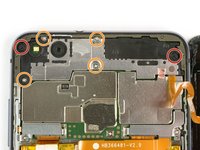
      • Use a pair of tweezers to remove the sticker.

      • Remove the two Phillips #00 screws.

      • Remove the four 2.5 mm Phillips #00 screws.

      Ask FixBot

      Add Comment

    4. Huawei P10 Lite Back cover Replacement: step 4, image 1 of 2 Huawei P10 Lite Back cover Replacement: step 4, image 2 of 2
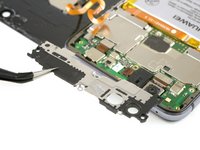
      • Use tweezers to remove the mainboard shield.

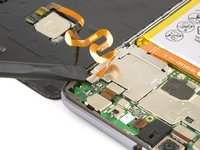
      • Use the flat end of a spudger to disconnect the finger print sensor flex cable.

      • When reassembling apply new adhesive where it is necessary.

      Ask FixBot

      Add Comment

Conclusion

To reassemble your device, follow these instructions in reverse order.

Cancel: I did not complete this guide.

15 other people completed this guide.

Dominik Schnabelrauch

Member since: 11/23/16

263,537 Reputation

682 Guides authored

6 Guide Comments

Great guide, but how do I move the fingerprint sensor to the new cover?

mela ross - Reply Share

You need to warm the adhesive so it can be loose

Adwell Cellular - Reply Share

What adhesive should I use? Thank you!

Calin GV - Reply Share

Nice guide! Thanks! I got a little question about the coloring of the back panel. What kind of coloring is it? Is it a coating you can take off, or is it more like a layer of paint you can scrape off? I am wondering, because I want to clear the back of my Huawei P10 lite. I hope it’s possible though.

Daan - Reply Share

Can you send me please back cover.

I'm from Nepal .

Md Usman - Reply Share

Add Comment

View Statistics:

Past 24 Hours: 4

Past 7 Days: 18

Past 30 Days: 105

All Time: 41,367