Free Shipping on Domestic Orders $75+

Huawei M750 Speaker Replacement

What you need

    1. Huawei M750 Speaker Replacement, Battery: step 1, image 1 of 1
      • Depress the top of the battery cover, and pull downwards towards the base of the phone.

      Ask FixBot

      Add Comment

    2. Huawei M750 Speaker Replacement: step 2, image 1 of 1
      • Remove the battery by levering the battery out, using the cut just below the camera.

      Ask FixBot

      Add Comment

    1. Huawei M750 Speaker Replacement, Back Panel: step 3, image 1 of 1
      • Use the opening tool to start prying the camera and speaker cover, starting from the battery side.

      • Work the opening tool around the border of the camera and speaker cover, until it comes loose.

      Ask FixBot

      Add Comment

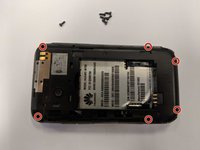
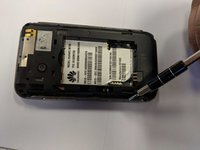
    2. Huawei M750 Speaker Replacement: step 4, image 1 of 2 Huawei M750 Speaker Replacement: step 4, image 2 of 2
      • Using the T5 Torx screwdriver, remove the six 6mm screws.

      Ask FixBot

      Add Comment

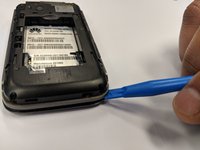
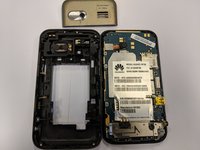
    3. Huawei M750 Speaker Replacement: step 5, image 1 of 2 Huawei M750 Speaker Replacement: step 5, image 2 of 2
      • Using the opening tool, pry the back panel from the front panel.

      • Work your way around the phone until the panels separate evenly.

      • This step may require a substantial amount of leverage.

      Ask FixBot

      Add Comment

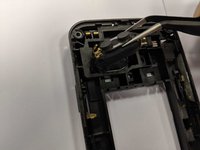
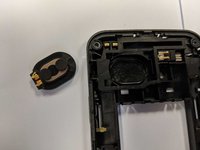
    1. Huawei M750 Speaker Replacement, Speaker: step 6, image 1 of 2 Huawei M750 Speaker Replacement, Speaker: step 6, image 2 of 2
      Tool used on this step:
      Tweezers
      $4.99
      Buy
      • Pull out the speaker with a tweezers or your hands.

      Ask FixBot

      Add Comment

Conclusion

To reassemble your device, follow these instructions in reverse order.

Cancel: I did not complete this guide.

Sebastian Solis

Member since: 02/21/18

91 Reputation

1 Guide authored

0 Guide Comments

Add Comment

View Statistics:

Past 24 Hours: 0

Past 7 Days: 4

Past 30 Days: 30

All Time: 487