Free Shipping on Domestic Orders $75+

Huawei Honor 6x Rear Camera Replacement

What you need

    1. Huawei Honor 6x Rear Camera Replacement, SIM Card: step 1, image 1 of 1
      • Turn off the device.

      Ask FixBot

      Add Comment

    2. Huawei Honor 6x Rear Camera Replacement: step 2, image 1 of 2 Huawei Honor 6x Rear Camera Replacement: step 2, image 2 of 2
      • Insert the SIM Card Eject Tool into the SIM card tray hole.

      • Press the eject tool into the hole until the tray clicks open.

      Ask FixBot

      Add Comment

    3. Huawei Honor 6x Rear Camera Replacement: step 3, image 1 of 1
      • Remove the SIM tray from the device using two fingers.

      • When reinserting the SIM card, be sure it is properly aligned with the SIM tray.

      Ask FixBot
      Add Comment

    4. Huawei Honor 6x Rear Camera Replacement: step 4, image 1 of 1
      • Remove the SIM card from the compartment using two fingers.

      Ask FixBot
      Add Comment

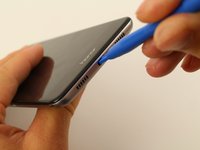
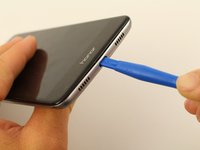
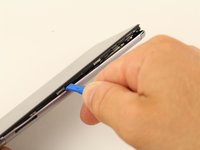
    1. Huawei Honor 6x Rear Camera Replacement, Back Cover: step 5, image 1 of 2 Huawei Honor 6x Rear Camera Replacement, Back Cover: step 5, image 2 of 2
      • Insert a plastic opening tool into the Micro USB charging port with the the angled side of the tool facing the screen.

      • Pry the screen off the back of the phone by pushing down on the opening tool.

      Ask FixBot
      Add Comment

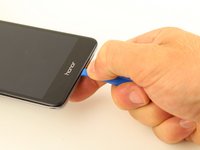
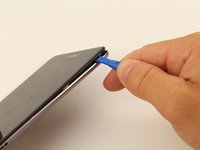
    2. Huawei Honor 6x Rear Camera Replacement: step 6, image 1 of 3 Huawei Honor 6x Rear Camera Replacement: step 6, image 2 of 3 Huawei Honor 6x Rear Camera Replacement: step 6, image 3 of 3
      • Slide the opening tool or spudger along the bottom of the phone and around the edge.

      Ask FixBot

      Add Comment

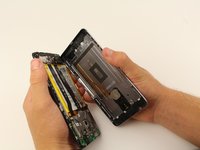
    3. Huawei Honor 6x Rear Camera Replacement: step 7, image 1 of 2 Huawei Honor 6x Rear Camera Replacement: step 7, image 2 of 2
      • Once three sides of the screen are detached, pry the phone apart using two hands.

      • When separating the back panel from the screen, do not pull them too far apart. There is an interconnect that is attached to both sides that could break, or tear, if pulled too far.

      Ask FixBot

      Add Comment

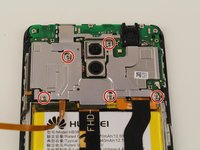
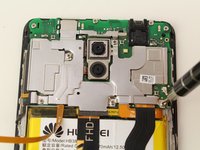
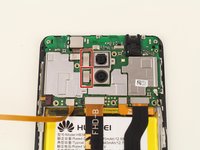
    4. Huawei Honor 6x Rear Camera Replacement: step 8, image 1 of 3 Huawei Honor 6x Rear Camera Replacement: step 8, image 2 of 3 Huawei Honor 6x Rear Camera Replacement: step 8, image 3 of 3
      • Remove the five 4mm Phillips #00 screws using a screwdriver.

      Ask FixBot

      Add Comment

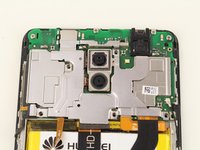
    5. Huawei Honor 6x Rear Camera Replacement: step 9, image 1 of 1
      • Remove the motherboard cover from the device using a spudger or your fingers.

      Ask FixBot

      Add Comment

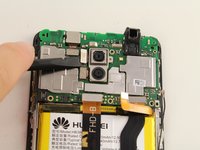
    1. Huawei Honor 6x Rear Camera Replacement, Rear Camera: step 10, image 1 of 3 Huawei Honor 6x Rear Camera Replacement, Rear Camera: step 10, image 2 of 3 Huawei Honor 6x Rear Camera Replacement, Rear Camera: step 10, image 3 of 3
      • Pry the two connectors off by wedging a spudger, or your finger, underneath the connector.

      Ask FixBot

      Add Comment

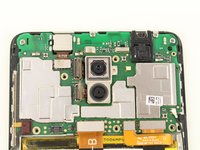
    2. Huawei Honor 6x Rear Camera Replacement: step 11, image 1 of 1
      • Gently remove the camera assembly using a spudger or two fingers.

      Ask FixBot

      Add Comment

Conclusion

To reassemble your device, follow these instructions in reverse order.

Cancel: I did not complete this guide.

2 other people completed this guide.

M Morgan

Member since: 10/08/18

686 Reputation

1 Guide authored

Team

Cal Poly, Team S13-G5, White Fall 2018 Member of Cal Poly, Team S13-G5, White Fall 2018

CPSU-WHITE-F18S13G5

4 Members

84 Guides authored

0 Guide Comments

Add Comment

View Statistics:

Past 24 Hours: 1

Past 7 Days: 7

Past 30 Days: 35

All Time: 1,493