Free Shipping on Domestic Orders $75+

How to open the TicWatchPro

What you need

  1. How to open the TicWatchPro, Unfasten the screws: step 1, image 1 of 1
    • Before starting repairs, take your watch off the charger and power it down.

    • Remove the four 3.9 mm-long Torx T3 screws.

    • Depending on the condition of your driver, a Torx T4 bit may fit better.

    • Don't try to detach the back cover yet. It is still connected to the watch assembly.

    Ask FixBot

    Add Comment

  2. How to open the TicWatchPro, Open the watch: step 2, image 1 of 2 How to open the TicWatchPro, Open the watch: step 2, image 2 of 2
    • Be careful not to strain the sensor flex cable during this procedure.

    • Carefully lift the back cover by the watch crown edge and swing it open to an upward position.

    Ask FixBot

    Add Comment

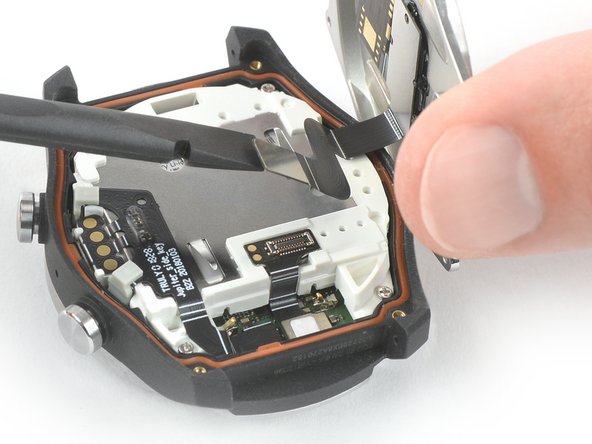
  3. How to open the TicWatchPro, Disconnect the sensor cable: step 3, image 1 of 2 How to open the TicWatchPro, Disconnect the sensor cable: step 3, image 2 of 2
    • Use the flat end of a spudger to pry up and disconnect the sensor flex cable.

    Ask FixBot

    Add Comment

  4. How to open the TicWatchPro, Remove the back cover: step 4, image 1 of 1
    • Remove the back cover.

    Ask FixBot

    Add Comment

Conclusion

To reassemble your device, follow these instructions in reverse order.

Repair didn’t go as planned? Check out our Answers community for help.

Cancel: I did not complete this guide.

2 other people completed this guide.

Dominik Schnabelrauch

Member since: 11/23/16

260,657 Reputation

682 Guides authored

Team

iFixit Member of iFixit

Staff

122 Members

27,525 Guides authored

2 Guide Comments

T w lte 4G. Botón power como cambiar no conecta

yo tuve - Reply Share

Mostrar tutorial (si existe). gracias

yo tuve - Reply Share

Add Comment

View Statistics:

Past 24 Hours: 0

Past 7 Days: 2

Past 30 Days: 34

All Time: 2,218