
How to make Dyson AM07 (more) useable!

Frank and one other contributor
Last updated on Feb 19, 2016
Views: 17K
View statistics:
- Past 24 Hours:
- 3
- Past 7 Days:
- 36
- Past 30 Days:
- 161
- All Time:
- 17,078
Comments: 6
2 comments on steps, 4 guide comments.
Go to guide commentsCompleted: 4 5
4 people have marked this guide "completed." Will you be next?
5 people have marked this guide "completed." Including you — great job!
Favorites: 0 1
No one has favorited (and subscribed to) this guide. Will you be the first?
1 person has favorited (and subscribed to) this guide — and that's you!
Community-Contributed Guide
An awesome member of our community made this guide. It was not created by iFixit staff.
Introduction
Go to step 1 ↓The remote control for the Dyson AM07 (and possibly other Dyson fans and heaters - I only own the AM07, so I don't know) has a sleek design, but unfortunately it's a case of "function follows form".
Without looking at it, you can't tell where the buttons are and what they do because they are flush with the rest of the thing. Which makes this remote not very useable, especially at night.
Luckily, there's a very easy (and reversible) fix for this. All you need is a glue gun! :)
What you need
Tools

-
-
-
This is from the manual (http://www.dyson.com/medialibrary/Files/...).
 Ask FixBot
-
-
-
Plug in your glue gun and let it heat up.
-
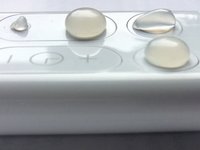
I made a big dot on the oscillation button, another one on the Standby ON/OFF button, and two more dots (big and small) on the Airflow control buttons. I don't use the Sleep Timer so I haven't added any dots to those two buttons.
-
If you don't get it right on the first try, don't worry. Just wait a couple of seconds for the glue to cool down and remove the dot. The glue comes off without leaving any residue or marks on the plastic.
-
-
-
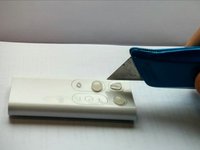
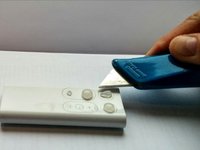
I used a carpet cutter (sharpest knife I had lying around) to cut the dot on the Standby ON/OFF button into an "I" shape for a little bit of different tactile feedback.
-
Some more ideas for customization: while the glue is still fluid, stick little parts of plastic, for example, in it to get different kind of buttons.
-
-
-
-
They could look better but the buttons are a lot more useable now, in my opinion.
-
-




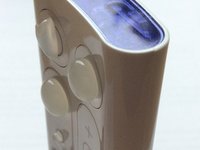
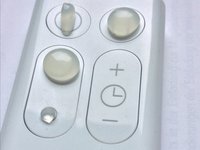
To undo these changes and restore your remote, just peel off the dots.
Cancel: I did not complete this guide.
4 other people completed this guide.

4 Guide Comments
Bit a crap mod me thinks… not well thought out… its pretty obvious that if you do this the control will no longer sit nicely on top of the fan! Better off learning your left from your right ;-)
Useful, but not sure about the appearance.
I’m interested in how to alter a Dyson Hot & Cold fan bought in the UK for use in the US…if anyone has recommendations?
