
How to install a different operating system on an Android Phone

Sebastian and one other contributor
Last updated on May 23, 2023
Views: 290K
View statistics:
- Past 24 Hours:
- 146
- Past 7 Days:
- 1,029
- Past 30 Days:
- 4,805
- All Time:
- 290,180
Comments: 62
55 comments on steps, 7 guide comments.
Go to guide commentsCompleted: 76 77
76 people have marked this guide "completed." Will you be next?
77 people have marked this guide "completed." Including you — great job!
Favorites: 11 12
11 people have favorited (and subscribed to) this guide. Will you be next?
12 people have favorited (and subscribed to) this guide — including you!
Community-Contributed Guide
An awesome member of our community made this guide. It was not created by iFixit staff.
Bullets!
Better coordination with markups and the color/type of bullets will help make this guide more clear!
Introduction
Go to step 1 ↓A custom ROM (aka aftermarket firmware) is a modified version of an existing operating system, that is not officially supported by the manufacturer of a device. Some custom ROMs are based on existing mobile OSs, like Android, and some are based on PC operating systems, such as Manjaro or Ubuntu. They’re different from devices that use stock firmware in that they can offer features and enhancements not found in stock versions of Android, do not contain bloatware, and do not depend on the devices manufacturer for software updates.
The most popular custom ROMs include LineageOS, LineageOS for microG, Paranoid Android, ProtonAOSP, GrapheneOS and CalyxOS.
Some custom ROMs, like GrapheneOS and ProtonAOSP, offer a WebUSB-based installer that is easier to use for most users, but in this guide, I will be covering the command-line based installation as it is the more traditional and universal approach to installing custom ROMs.
Warnings
- Unlocking the bootloader will reset your phone, so make sure you have all your data backed up!
- This process may void your warranty with some manufacturers.
- A modified device will trip the Play Integrity API (formerly SafetyNet Attestation API) which can cause some services like GPay to stop working.
- This will make your device vulnerable against hackers with physical access to your device, so do not unlock the bootloader on a device that you intend to carry state/company secrets on.
- Flashing a custom ROM can be risky and may cause unexpected issues or even brick your device. It is recommended to only flash a custom ROM if you are experienced with Android.
- Always use caution and read the instructions carefully when unlocking your device's bootloader or flashing a custom ROM. Improperly following the steps can cause irreversible damage to your device.
- Before flashing a custom ROM, make sure it is compatible with your device and check for any known issues or bugs reported by other users.
- If you encounter any issues during the unlocking or flashing process, do not hesitate to seek help from experienced users on forums or support channels provided by the custom ROM developer.


-
-
-
Now you just need to tap the Build number repeatedly, until you get a confirmation message saying "You are now a developer!". I already enabled developer options on my device, so I don’t need to do it again.
-
-
-
-
In the developer options, find the OEM unlocking option and enable it.
-
-
-
In the developer options, find the USB debugging option and enable it.
-
-
-
Plug your phone into your computer via a USB-C to USB-A Cable.
-
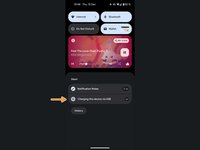
Pull down the notification shade and select Charging this device via USB.
-
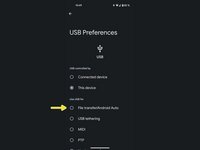
Select the option File transfer/Android Auto.
-
-
-
-
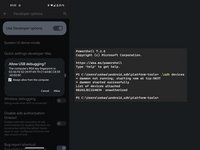
Open the terminal application on your computer with the SDK Platform Tools installed and enter
adb devices -
This should trigger a popup on your device. Make sure to have the checkmark ticked and click Allow.
-
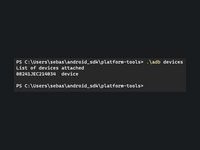
You can run the command again to check if it worked. It should now say
deviceinstead ofunauthorized.
-
-
-
Enter the command
adb reboot bootloader -
Wait a couple seconds until your device rebooted into the bootloader, then enter the command
fastboot flashing unlock -
You should now see a prompt similar to the one shown in the picture. Use the volume rocker to choose the Unlock the bootloader-option and confirm by pressing the power button.
-
-
-
-
-
If your device rebooted after unlocking the bootloader, boot into the bootloader again by pressing and holding the power- and volume-down-button until the device has rebooted into the bootloader.
-
-
-
Download the TWRP Recovery for your device or the recovery that came with your custom ROM.
-
Enter the command
fastboot boot [directory]\[filenameOfTheRecovery].imgand wait until your device has rebooted into recovery mode.
-
-
-
Download the OS image for the custom rom you want to install.
-
Enter the command
adb sideload [directory]\[filenameOfTheOsImage].zip
-
-
-
Download the GApps package you want to install.
-
Repeat step 10 to reenable ADB sideload.
-
Enter the command
adb sideload [directory]\[filenameOfTheAppsPackage].zip
-
-
-
This might take some time, but as long as the phone is not boot looping (repeatedly rebooting), everything should be fine.
-
-


 Ask FixBot






To restore your device to its factory condition, follow these instructions with an OS image provided by your device manufacturer.
Cancel: I did not complete this guide.
76 other people completed this guide.

7 Guide Comments
The problem is you need the exact customt TWRP recovery AND exact install .zip for the model number. There is no unversal twrp file or universal android, or utbuntu. Each manufacturer, model, useds a 'custom twrp file. and unique identifier for android 'custom' rom even for android itself.
if you install wrong file not for the particular device, it won't work and you need to customized or find the exact model rom known as custom rom. even if the phone is running android. you can only flash the manfucturere rom for that device. or c ustomized it yourself
oem unlocking just means you can FLASH it. most devices now have oem locked and you cannot flash anything on it. improperly flashing wrong rom can brick the device and if there is no custom rom for download, there is nothing you can do. you have make one for yourself which needs the manufacturers drivers etc.
And you notice there is no technical support about flashing your old tablets or phones from the manufacturere to download and firmware. or download section. Because they don't want people to be flashing and old phone or tablet. You neeed both custom recovery plus 'custom' rom for that operating system to work. and that .zip files is from manufacturer. most people dont have the tech ability to make custom roms or custom android for their device and with so many models and very little demand it's not worth making it.you see droid kits which only works on samsung phones or tablets and they have downloads to reflash it is BRICKED.
Please 🙏 make a video on it I didn't really understand from step 7.
